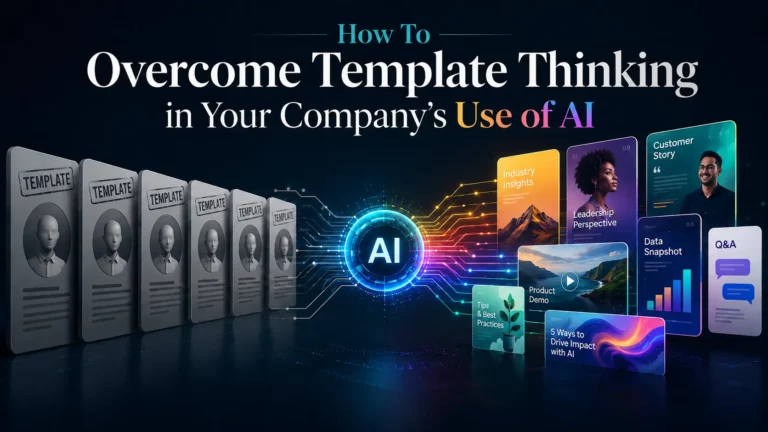
TL;DR: Driving AI adoption in the workplace often stalls not because employees reject the tools, but because they only use a small part of what those tools can do – usually choosing one setting and repeating it everywhere. This “template thinking” comes from approaching powerful, flexible AI based on habits formed while working with older, more limited software. It’s expensive: companies are paying for capabilities their teams never touch, and this is one of the main reasons why most AI investments show low measurable returns. The solution isn’t pressure, it’s five practical steps: show employees what’s possible, train them hands-on, encourage creative use, and build a continually growing knowledge base. Training employees to use AI effectively will no longer be simply “imposed” and will become “attractive”.
Many managers rolling out AI-based solutions notice that employees use only a fraction of what these tools can do. This is especially true of creative AI tools.
This isn’t a niche observation. In a 2025 Gallup study of more than 19,000 workers, 44% of employees who don’t use AI said the reason is that they don’t believe it can help with the work they do – not because it’s unavailable; they don’t see how it can benefit them. This is the essence of template thinking: evaluating a new tool based on the limitations of the old ones.
Why Template Thinking Is Expensive, Not Just Suboptimal
It’s tempting to view underutilized AI features as a minor inefficiency. In fact, template thinking is one of the most expensive yet hidden problems in AI implementation, and there are two reasons for this.
First, you pay for the entire tool, but only use a small part of it. Prices for AI platforms are based on their full range of capabilities. When a team uses one configuration, one prompt template, or one report template in every situation, the organization is funding resources that never deliver value. The license cost is the same whether employees use 10% or 90% of the purchased functionality.

Secondly, template thinking is one of the main reasons for the gap between AI implementation and ROI. The same Gallup research cites an MIT study finding that only about 5% of organizations report measurable ROI from their generative AI investments – enthusiasm and accessibility have not translated into business value for most. The reason is rarely in the tool itself. It’s in how people use it: tying a flexible tool to old habits produces old results at a new price. Value comes from changing how the work is done, not from the purchase itself.
So the goal isn’t to “expand the use of AI” for the sake of expansion. It’s about taking employees beyond their normal responsibilities and giving them access to the tool’s capabilities where they truly add value.
What Template Thinking Looks Like Across Tools
The avatar example below is specific to our platform, but template thinking is found everywhere creative AI tools are used. A few patterns most teams will recognize:
- One prompt, reused forever. A marketer finds a single ChatGPT prompt that produces an acceptable result, saves it, and runs everything through it – never adjusting tone, audience, or format to suit the task at hand. The result is always “good” but never excellent.
- One template for every audience. A sales team builds one AI-generated email and sends lightly edited copies to every segment, discarding the tool’s ability to personalize the message and tone for every recipient.
- One dashboard view. An analyst configures a single AI-assisted report and reuses it for every stakeholder, while a tool could provide different data for each audience.

Here’s the avatar version. With our platform, you can create an AI avatar – a digital character that serves as the host or speaker of a presentation, webinar, or other video content. Or a conversational chat avatar available 24/7, acting as a support agent, sales consultant, or product specialist. Authors have almost unlimited creative freedom: they can choose the basic appearance, voice, clothing, hairstyle, and communication style for each avatar.
In practice, things often turn out differently. The responsible employee chooses one appearance, one voice, and one fixed communication style – and this avatar remains unchanged from presentation to presentation, from section to section, from department to department. Yet the better approach seems obvious: create a unique avatar, precisely matches each specific situation: a welcoming and friendly person to onboard new employees; a clear and authoritative speaker for the financial report; a different language and persona for each market.
Why is this happening? Don’t be tempted to chalk it up to laziness. A more likely explanation, as suggested by Gallup’s data, is that many employees are accustomed to tools that either offer far fewer capabilities than AI or that seem complex and require a lot of training. They transfer those expectations into a tool that no longer works that way.

How to Tell If Your Team Has a Template-Thinking Problem
Before correcting it, make sure it actually occurs. A few specific signals:
- The same AI output, configuration, or template appears across contexts where the audience or goal clearly differs.
- Employees can’t describe more than one or two things the tool does, even though it does many more.
- Activity is low but stable – people log in and work, but the task’s complexity doesn’t increase over time.
- New features are being introduced, but no one notices or uses them.
- When you ask why a setting was chosen, the answer is “that’s how we did the last one”.
If even a few of these statements are true, the problem isn’t the tool or the people – it’s that no one has shown the team what a “good” result looks like or created a safe environment to explore it.
What Can Be Done About It? Five Practical Steps
Five simple steps can go a long way to helping employees fully leverage the potential of AI.

1. Showcase what AI tools can actually do
Create a presentation showcasing the capabilities of your chosen AI tools and explaining why their creative use is beneficial. A well-made overview helps each employee start their own thinking and start looking for ideas they can bring to life with AI. The most effective presentation doesn’t just list features – it pairs each capability with a concrete “before” and “after” example: the generic template version next to the customized version, so the value of going beyond the default settings is clear at a glance. For maximum impact, the presentation itself should be created using the same tools it describes – a proof of concept and a demonstration in one.
2. Run hands-on training that proves how simple the tools are
Good old training methods are still effective. Take Pitch Avatar, for example: anyone who has used it knows that AI characters can be created quickly and easily, without any special skills. But without training, most employees will never know that. Instead, they approach AI tools based on past experience, which isn’t always positive. Structure training sessions around real-world challenges employees actually face (not abstract demos) so that they leave with something useful to add to their work. Pay special attention to practical exercises. The main principle: trying something once is more valuable than seeing or hearing about it a hundred times.
This is more important than it might seem, because training is where the most powerful lever for implementation is concentrated. Gallup found that the top barriers to AI adoption are an unclear use case (16%), legal or privacy concerns (15%), and a lack of training or knowledge (11%) – and role-specific, task-based training addresses all three simultaneously.
3. Hold regular experience-sharing sessions
Successful ideas and creative insights from individual team members should become a shared resource. Hold regular meetings where employees can share ideas and discoveries. Keep them short and to the point (one person demonstrating one example that worked, showing the actual result on screen) to keep the format easy to maintain. These meetings have the added benefit of providing less confident employees with concrete, real-world examples of successful use of AI tools, lowering the barrier to adoption. They also help management identify the people best suited to lead AI-related initiatives.
4. Recognize and encourage creative and effective AI usage
This step does not require much explanation. One important point worth noting is that in creative work using AI, success criteria should not be purely formal. Creative work deserves creative recognition – the inventive solution should be rewarded, not just one that meets expectations. Recognition doesn’t have to be financial – demonstrating a successful AI application in a team meeting or knowledge base often encourages experimentation more than just a bonus, as it signals that the research is noticed and valued.
5. Build a living knowledge base for your AI tools
Presentations, instructions, tips, ideas, and suggestions should always be easily accessible and easy to find. This allows employees to refresh their knowledge as needed, share their own thoughts, or draw on the team’s accumulated experience. The key word here is “living” – a knowledge base that’s written once and never updated becomes just another ignored template. Assign responsibility, incorporate the best findings from the sharing sessions, and keep it updated as the tools evolve. Internal knowledge is a valuable asset that is worth actively developing and protecting.
The Common Thread: Leaders Set The Tone
None of these five steps will work on their own unless management intervenes. That same Gallup research found that only 28% of employees in organizations implementing AI strongly agree their manager actively supports their team’s use of it – yet employees who receive such support are 2.1x times more likely to use AI regularly and are far more likely to find it useful. The essence of all five steps is simple: employees focus on the extent to which management expects, supports, and encourages the creative use of AI. (For more on the human aspect, see our article on putting people first when implementing AI).