Discover simple strategies to transform your online event attendees into active participants.
What if the first 90 seconds of your presentation could determine its entire success or failure? In our fast-paced digital world, you can lose an audience’s attention in as little as 15 seconds. This underscores the importance of transforming passive attendees into active, engaged participants. Whether you’re making a sales pitch, delivering a team update, or giving a keynote speech, your ability to captivate and maintain attention is crucial for persuading, informing, and achieving your goals.
This guide goes beyond simple tips and tricks to provide a comprehensive strategic framework for mastering audience engagement. We will explore a proven three-phase process that covers the essential steps you need to take before, during, and after your presentation to ensure your message resonates and drives action.
What is Audience Engagement, and Why is It Important for Business?
In short, engagement is when the audience actively participates in actions related to the presentation and interacts with the speakers and each other. It differs from a one-way information dump by fostering a two-way dialogue. However, modern engagement goes deeper than just participation – it also includes cognitive and emotional connections. It’s about making your audience think, feel, and ultimately care about what you have to say.
The case for prioritizing engagement is clear. A Prezi study found that over 60% of online event and webinar attendees believe that engagement makes a presentation more interesting, persuasive, and memorable. An engaged audience is more likely to:
- Retain information: Active participation improves memory retention of ideas.
- Be persuaded: Emotional and intellectual connections build trust and strengthen your arguments.
- Take action: An audience that feels involved is more likely to respond positively to your call to action, whether it’s purchasing a product, adopting a new process, or embracing a new idea.
Ultimately, engagement is not just a soft skill – it is a key business competency that directly impacts brand recall, lead generation, and revenue.
Three Phases of Engagement: Before, During, and After
The most effective presenters know that audience engagement isn’t something that occurs only when the slides are displayed. It is an ongoing process that can be divided into three distinct phases. Mastering this lifecycle is essential to consistently creating impactful presentations.
- Phase 1: Presentation Plan. This is the strategic planning stage, where you establish a solid foundation for success by understanding your audience and structuring your narrative effectively.
- Phase 2: Engaging During the Main Event. In this tactical execution phase, you employ various techniques to capture and maintain the audience’s attention from your opening word to your final point.
- Phase 3: Post-Presentation Activities. This critical follow-up stage involves converting the energy and interest generated during your presentation into lasting relationships and measurable outcomes.
Now, let’s explore each phase in more detail.
Phase 1: Presentation Plan
The preparation you do before stepping on stage (or joining a video call) has the most significant impact on your success.
Know Your Audience: The Foundation of Any Engagement
Before you create a single slide, you must understand who you are talking to. Go beyond basic demographics and ask more profound questions:
- What are their primary job roles and responsibilities?
- What are their biggest challenges and pain points related to your topic?
- What do they already know, and what misconceptions might they have?
- What do they hope to gain from this presentation? What’s in it for them?
A practical yet often overlooked technique is to use research tools to understand your audience’s intent. For example, go to Google and type in your presentation topic. The “People also ask” section and the “Related searches” at the bottom of the page can provide valuable insights into the specific questions and terms your audience is exploring. This approach offers a clear roadmap to address their interests and needs.
Structure Your Presentation for Maximum Impact
Humans are naturally drawn to stories, making a story-based presentation much more engaging than a simple list of facts. Consider using a classic story framework:
- The Beginning: Start by establishing the current situation and introducing a relevant problem or conflict for your audience. This represents the “what is” state.
- The Middle: This is the longest part of your presentation. Illustrate the struggles and journey toward a solution. Create contrast by showing the potential future alongside the present situation. Introduce your idea or product as the catalyst for change.
- The End: Conclude by painting a clear picture of the “new bliss” or the positive outcome that your solution offers. This is the “what could be” state.
Pre-Event Interaction: Whet Audience Appetite
Engage your audience before the presentation begins. This not only creates excitement but also helps you gather valuable insights. You can distribute quizzes, surveys, or assessments both before and after the presentation. For example, a week before a marketing automation webinar, consider sending a short poll asking, “What is the biggest time-waster in your current marketing workflow?”
The key is to ensure that all these interactions provide clear benefits. Whether through a gift certificate, a discount, or special collaboration terms, the focus should be on the value they receive.
Phase 2: Engaging During the Main Event
This is where your preparation pays off. The goal here is to maintain a continuous dialogue with your audience from start to finish.
The First 90 Seconds: Hook, Focus, and Preview
It was once thought that a Q&A session at the end of a presentation was sufficient for audience engagement. However, research indicates that viewers can lose interest within just 15 seconds to a minute. Those who remain engaged through the first three slides are more likely to stay for the entire presentation. Therefore, ensure active interaction with your audience right from the start. Begin with a powerful hook:
- Ask a provocative question: “What if you could reclaim 10 hours in your work week?”
- State a remarkable fact: “Did you know that teams who use this process reduce mistakes by 50%?”
- Tell a short, relatable story: “Let me share a story about a client who faced the same challenge you are experiencing.”
After the hook, clearly state the purpose of your presentation and provide a brief overview of the main points you will cover. This helps manage expectations and gives them a mental roadmap of what to expect.
Maintaining Pace: Techniques for the Midpoint of a Presentation
Monotony is the most effective killer of audience attention. To counter this, utilize several different engagement methods throughout your presentation. The key is to strategically manage your audience’s cognitive load. For every 7-10 minutes of dense content, plan a 1-2 minute “pattern interrupt” to help reset their focus.
- Interactive Q&A: Break the Q&A session into several parts. Pause after each major section to ask, “What questions do you have about what we’ve just covered?” This makes the session more conversational and less formal.
- Polls and Quizzes: Start with a quick poll or quiz with fun questions related to the presentation, promising prizes such as discounts or special offers for your product. This strategy will likely secure at least a couple of customers. You can also conduct another quiz toward the end of the presentation. Use polls to gauge understanding, gather opinions, or make real-time decisions about the presentation’s direction.
- Storytelling and Humor: Incorporate relevant anecdotes, case studies, and personal stories throughout your content. Stories create an emotional connection and make complex data more relatable. A well-timed, appropriate joke can also lighten the mood and re-energize the audience.
- Visuals and Variety: Use high-quality images, GIFs, and short videos to illustrate points and break up text-heavy slides. It’s even more effective if each part of the presentation, including the interactive segments, is delivered by different speakers. If you don’t have multiple presenters, you can create them using the Pitch Avatar presenter AI assistant.
The Speaker’s Role: Delivery and Body Language
How you deliver your message is as important as the message itself. Modulate your tone of voice to convey enthusiasm and emphasize key points. Move with intention and use gestures to reinforce what you are saying. In a virtual setting, making eye contact with the camera helps create a direct connection with your viewers.
Remember, you can organize active interactions not only during live broadcasts but also with recorded presentations. Use our Pitch Avatar’s unique feedback system for this purpose.
The Grand Finale: Summarize and Close with Impact
Your conclusion should be a powerful summary, not a slow fade-out. Briefly recap your 2-3 main points, reiterate the key message, and highlight what the audience should remember most. End with a strong, memorable closing statement that ties back to your opening hook or presents a compelling vision of the future.
Phase 3: Post-Presentation Activities
The presentation doesn’t end when the last slide is shown. This phase focuses on converting attention into action.
The Immediate Call to Action (CTA)
You know that the sooner you engage with a potential client after a presentation, the higher the likelihood they’ll become an actual client. This leads to the well-known “One Simple Next Step” rule: by the end of the presentation, it should be clear what single action the viewer should take to continue interacting with your company. This could involve clicking a link to view a demo version of your product or visiting the landing page. Ensure the call to action is clear, simple, and immediate.
Continuing the Conversation
While the “One Simple Next Step” rule is valuable, why not take a broader view? You can send quizzes, surveys, tests, or minute-long mini-presentations with interactive slides (including lead forms) both before and after the presentation. Send a follow-up email within 24 hours that includes:
- A thank you for their attendance.
- A link to the presentation recording and/or slides.
- A summary of the key takeaways.
- A reminder of the call to action.
Measuring Engagement Success
To improve, you must measure your efforts. Track key metrics to understand the impact of your engagement efforts:
- CTA click-through rate
- Number of demo requests or meetings booked
- Survey completion rate
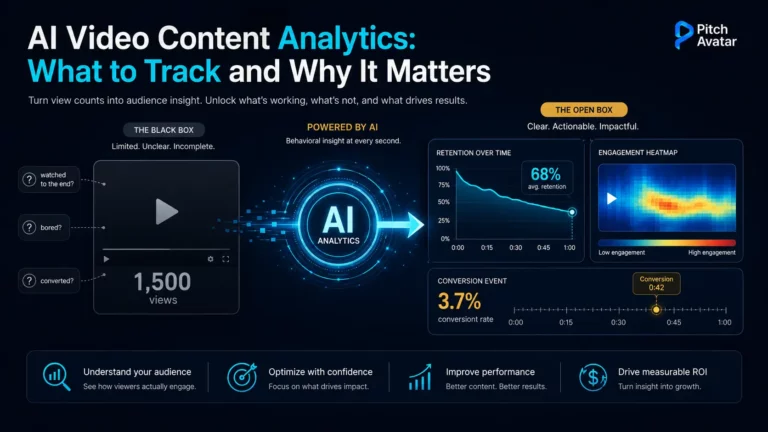
- Audience retention rate (for videos and webinars)
- Social media mentions and shares
Conclusion: Your First Step to More Engaging Presentations
In conclusion, these guidelines will be practical only if the audience perceives that you are fully immersed in the presentation topic and genuinely interested in it. In other words, to engage others, you must first engage yourself. By using a strategic three-step approach (planning your presentation, delivering it dynamically, and staying focused), you can transform any presentation from a monologue into a dynamic and valuable experience for your audience.
Wishing you all successful presentations and high revenues!