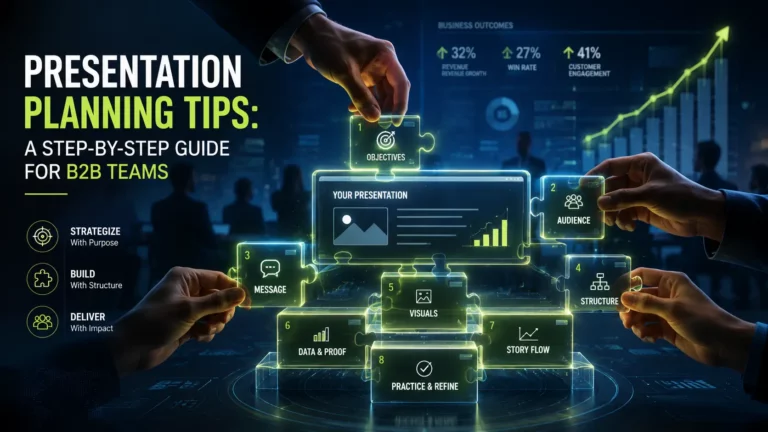
Most presentations fail before the first slide is created. The planning process (or lack of one) is usually where things go wrong. These presentation planning tips cover the full process: how to identify your audience, structure your message, design supporting slides, practice effectively, and increasingly, how to plan presentations that work even when you’re not in the room to deliver them.
Whether you’re an SDR preparing a personalized sales demo, an L&D manager building onboarding content for a distributed team, or a demand gen lead creating a webinar that needs to convert – the planning decisions you make before you open any software determine whether your presentation will achieve its purpose.
Key Takeaways
- Start with your audience’s needs, not your content – moving from the question “What do I want to say?” to “What do they need to hear?” is the single most important planning decision.
- Define one key message before creating slides; use the “so what?” test to cut anything that doesn’t fit.
- Use a named structure (Problem-Solution-Benefit works for most B2B pitches) to make your content predictable and persuasive.
- Plan your opening and closing first – they’re most memorable.
- Test your async version before scaling it; engagement analytics will tell you where you’re losing people.
Why Presentation Planning Matters
The average audience attention span on a single point on screen is just 47 seconds, and most business audiences get distracted by another screen during the event. The reason isn’t usually bad slides – it’s bad planning. Presenters open a template, start filling it in, and end up with a presentation that looks just like every other presentation their audience has seen this week.
Proper planning is what makes the difference between a presentation that moves people to action and one that’s forgotten before the meeting is over. For B2B teams specifically, the stakes are especially high: with an average of 13 stakeholders involved in each buying decision, a well-planned presentation builds a client base, schedules demos, and closes deals. A poorly planned one wastes everyone’s time and reflects negatively on your brand.
Start With Your Audience, Not Your Slides
The most common presentation planning mistake isn’t a bad slide design – it’s opening your presentation software before you’ve answered the most important question: What does this specific audience need to hear from me?
In presentation planning methodology, this is seen as a fundamental shift from speaker-centered thinking (“What do I want to say?”) to audience-centered thinking (“What do they need to hear?”). It sounds simple. Most presenters skip it anyway.
Before you open PowerPoint, Keynote, or any other tool, answer these four questions:
- Who is this audience? What’s their role, how familiar are they with your topic, and what is most important to them?
- What do they already know? Don’t explain what they already understand – you’ll lose them in the first three minutes.
- What outcome do I need from them? A meeting booked, a decision made, a concept understood? Be specific.
- What’s their biggest objection? Plan to address it directly, not avoid it.
For sales managers building pitch decks and for HR and L&D teams creating onboarding content, this audience analysis step is the difference between content that converts and content that gets ignored. The same key information, framed for the wrong audience, fails every time – a 73% of B2B buyers actively avoid suppliers whose outreach feels irrelevant.
Resist the temptation to choose the latest presentation or the first template you see. Whether you’re sketching on paper or typing into a notes app, the goal is the same: think about your audience before you think about your slides.
Define Your Main Message Before You Build a Single Slide
Once you know your audience, your next task is to identify the single most important thing you want them to take away. Not five things. One.
Garr Reynolds, author of Presentation Zen, recommends a simple exercise: if your audience could remember only three things from your presentation, what would they be? Write them down. Then ask which one is the most important. This is your main message.
The “So what?” test is the most useful filter in presentation planning. For every piece of content you’re considering including, ask: So what? Why does this matter to this specific audience? If you can’t answer this question clearly, eliminate it. This is harder than it sounds – it requires you to make decisions about what to exclude, and this is where most presenters fail. They include everything because they’re afraid of leaving something important behind. The result is a flood of information that overwhelms rather than convinces.
For B2B sales and marketing teams, a clearly defined main message also facilitates personalization at scale. Personalized presentations have a 68% higher chance of being viewed from start to finish, and are 2.3 times more likely to achieve their intended engagement outcomes. But personalization only works when the main message is already clearly stated – you can’t personalize a confusing argument.
Once your main message is clear, your welcome slide personalization, opening hook, and closing CTA will receive concrete support.
Choose a Structure That Matches Your Goal
Structure is what makes persuasion systematic and repeatable. Research shows that people retain structured information up to 40% more reliably than information presented in a freeform manner. For B2B teams that need presentations that work reliably (regardless of the company representative, market, and time zone), structure is a must.
The good news: you don’t need to invent a structure. Use one that’s already proven.
| Structure | Best for |
|---|---|
| Problem - Solution - Benefit | Sales pitches, product demos, investor decks |
| What? - So What? - Now What? | Executive summaries, board updates, decision requests |
| Past - Present - Future | Training and onboarding, process reviews, company updates |
| Comparison - Contrast | Competitive positioning, vendor evaluations, option analysis |

For most B2B pitches, Problem-Solution-Benefit is the most reliable starting point. You open by naming a problem the audience recognizes, you present your solution, and you make the benefit relevant and specific to them. The audience can follow this structure even if they are momentarily distracted – and they will be.
Once you’ve chosen a structure, build your presentation outline around it. The outline is your planning tool; slides will appear later. A question-based outline works particularly well: instead of writing “Slide 3: Problem”, write “Why does [specific problem] lead to [specific outcome]?”. This allows you to focus on the audience’s point of view, rather than your own.
Plan Your Opening to Hook Attention and Your Closing to Drive Action
The beginning and end of your presentation are remembered most. This is the positional effect – audiences tend to remember better the first and last things they encounter. Plan these two moments first, before you build the middle content.
For your opening, avoid the default. Don’t start with “Hi, I’m [name] and today I’ll be talking about…”. This is the presentation equivalent of a cold email that opens with “I hope this finds you well”. It signals that nothing interesting is coming.
Instead, plan a winning opening using one of these approaches:
- A surprising statistic that reframes how the audience thinks about the problem
- A short story that puts a human face on the problem you’re solving
- A provocative question that the rest of your presentation answers
The goal of your opening is to make the audience want to keep watching or listening. For async presentations (sales demos, training modules, recorded pitches), this is especially critical because there’s no social pressure keeping viewers. They’ll click away the moment they’re bored.
For your closing, end with a clear action, not just Q&A. Our cheat sheet for online presentations recommends ending with a summary, useful information, and actionable tips – without aggressive calls to action. The distinction matters: a summary reinforces what you’ve said, a practical tip gives the audience something they can use immediately, and a clear next step (book a call, download the guide, reply to this email) tells them what to do with their interest. Don’t leave them guessing.
One practical note: for async and AI-delivered presentations, Chat-Avatar can handle post-presentation questions 24/7, so your sales reps can focus on the high-intent follow-ups rather than answering the same FAQ for the hundredth time.
Design Slides That Support Your Message, Not Distract From It
Your slides are not your presentation. They’re supporting evidence for the argument you’re making. The most common slide design mistake (trying to fit as much information as possible) actively undermines your message by dividing your audience’s attention between reading and listening.
A few principles that remain the same in any context:
- One idea per slide. Each slide should have a single central objective. If you find yourself with two important points on one slide, split it into two slides. The progressive buildup of information helps to retain the audience’s attention and engage them in the process.
- Use your headers to state the conclusion, not the topic. Instead of “Q3 Results”, write “Q3 pipeline grew 40% YoY”. Instead of “Market Overview”, write “The market is changing faster than our competitors realize”. A header that states the conclusion tells the audience what to think about the evidence on the slide – a header that just names a topic makes them do that work themselves.
- Limit text, use visuals and short fragments. Reading and verbal processing use the same cognitive channels. When your slides are filled with sentences, your audience is either reading or listening – but not both. Use words as guideposts, not scripts.
- Choose the right chart for the right message. Chart selection is a strategic decision based on what information the data needs to communicate, not just a design preference. A bar chart compares discrete values; a line chart shows change over time; a scatter plot reveals correlation. The Pitch Avatar planning methodology includes a reference framework for matching diagram types to communication objectives – use it before defaulting to the diagram type your spreadsheet suggests.
The 1-minute-per-slide rule
A 20-minute presentation should have roughly 20 slides. If you’re spending more than a minute on a slide, there’s too much on it. This rule is useful as a planning benchmark: count your slides, multiply by one minute, and see if that matches your allocated time. If it doesn’t, you have a content problem to solve before you have a design problem.
Practice The Right Way - Including Testing Your Async Version
Practice is necessary, but most presenters practice incorrectly. Running through slides in your head is not practice. Reading your speaker notes is not practice. Practice means delivering the presentation out loud, in conditions that are as close to real life as possible.
The most useful technique is focused practice: take one section (especially your opening) and deliver it repeatedly until it’s automatic. You shouldn’t memorize word-for-word (that leads to blanking out when you lose your place), but your opening should be so familiar that nerves don’t affect it. The first 60 seconds set the tone for everything that follows.
Rehearse before you think you’re ready. The principle from presentation coach Olivia Mitchell is sound: once you have the basic flow sorted, try it out. You’ll find out how long it actually takes to deliver, which is almost always longer than you estimated. You’ll also discover which transitions are awkward and which slides need more explanation – problems that are much easier to fix before you’re in front of an audience.
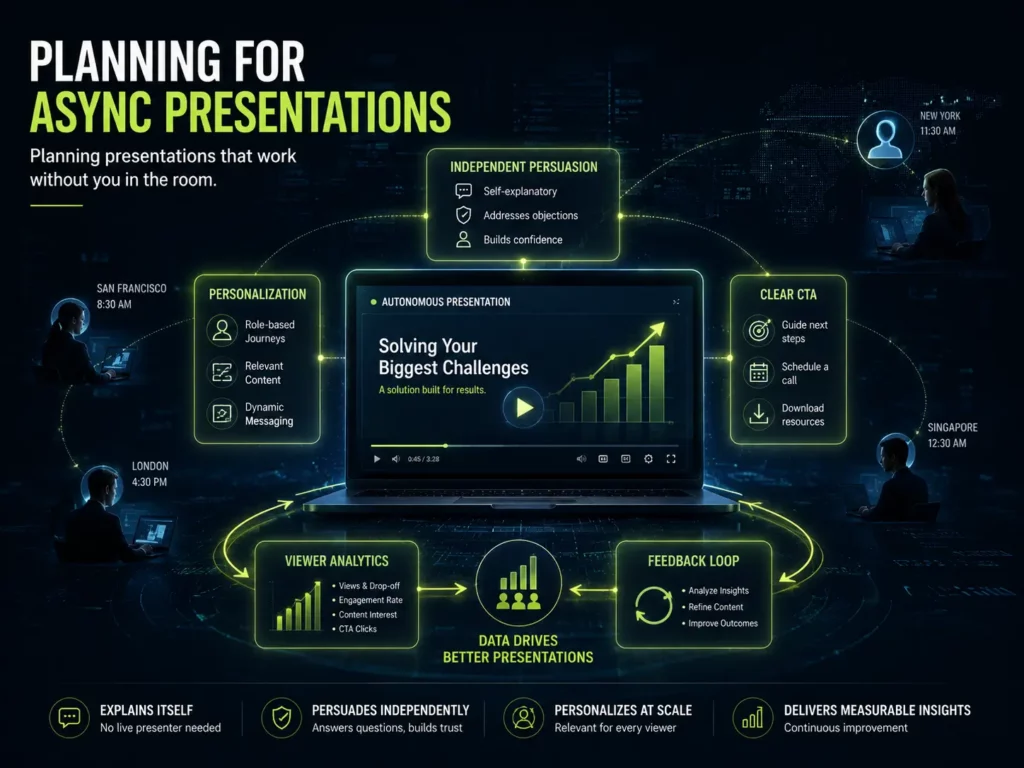
For async and AI-delivered presentations, “practice” means something different. Send a test link to a colleagues and review the engagement analytics: Which slides did they skip? Where did they drop off? Did they click the CTA? This kind of data-driven rehearsal is only possible with async delivery, and it’s far more useful than just a polite check from a friend. Pitch Avatar’s per-slide engagement analytics give you exactly this feedback loop – use it before mass sending.
Time Saving Presentation Planning Tips for Busy Teams
For SDR managers, demand gen leads, and L&D directors who are already stretched to their limits, here’s how to plan presentations more effectively without sacrificing quality:
- Start immediately. As soon as you know you have a presentation to build, start thinking about it. You’ll refine your message and come up with better examples in your free time: on the way to work, between meetings, while making coffee. Starting early reduces total planning time.
- Draft the main message first. Before you gather evidence, before you design slides, before you do anything else – write your core message in one sentence. Everything else serves the purpose of this sentence.
- Indicate the research you need. Don’t do basic research on your topic. Plan your structure first, then identify exactly where you need a supporting statistic, a case study, or a quote. Go find those specific things. Basic research takes a lot of time.
- Don’t brainstorm for content. The art of planning a presentation is choosing the information your audience needs – and no more. You need to select, not gather. If you’re brainstorming, you’re going in the wrong direction.
- Collect your resources and identify constraints before you finalize. The final step in a strategic presentation plan is a practical test: what assets do you have, what are your time and format constraints, and does your plan fit within them? This pre-launch check prevents the common problem of discovering a content gap the night before you present.
Planning Presentations That Work Without You In The Room
None of the standard presentation planning advice addresses this, but it’s the reality for most B2B teams in 2026: a significant portion of your presentations will be consumed without you present to deliver them. Sales demos sent as async links. Training modules watched on demand. Product overviews embedded on landing pages.
According to Gartner B2B buying journey research, B2B buyers now spend only about 17% of their total purchase journey meeting with potential suppliers – the rest is independent research, peer conversations, and content review. Your presentation has to do the persuading even when you’re not in the room.
Planning for async delivery requires a different mindset:
- The deck must persuade independently. In a live presentation, you can read the room, answer objections in real time, and adjust your energy to match the audience. In an async presentation, none of that is available. Every slide needs to carry its own weight. Your opening hook needs to be stronger. Your structure needs to be more clearer. Your CTA needs to be clearer.
- Plan for personalization scalability. One main script, personalized for each recipient. Personalized links let you send customized versions to individual prospects. Personalized presentations are 68% more likely to be viewed from start to finish – and for async delivery, completion rate is everything.
- Plan for multilingual audiences from the start. If your presentation will reach audiences in multiple markets, build the script with localization in mind. Pitch Avatar’s dubbing capability translates and re-voices existing video content into multiple languages without re-recording – but the cleaner and more modular your original script, the better the localized versions will perform.
- Use analytics to iterate. At the end of each session, analyze the analytics report on how viewers interacted with individual slides – where they spent time, where they dropped off, and whether they clicked through. This data is your feedback step. Use it to improve the next version.
Conclusion
The planning process here follows a specific sequence: start with your audience, identify a single key message, choose a structure that fits your goal, plan your opening and closing first, design slides that support rather than compete with your message, practice with real feedback, and (increasingly) plan for the reality that your presentation will often be viewed without your presence.
A well-planned presentation is only half the job. The other half is making sure it reaches the right people, in the right language, at the right time – and that you know what happened after they watched it.