![Koloman Moser, Frommes Kalender [Fromme’s Calendar], 1899](https://pitchavatar.com/wp-content/uploads/ultra-short-presentation-768x432.webp)
Every business professional knows the traditional presentation formulas: Guy Kawasaki’s 10 slides in 20 minutes, or TED’s 18-minute format. But here’s the reality: your prospects, customers, and stakeholders don’t have 20 minutes to spare. Research shows that presentation viewers lose interest after just 10 minutes, and in B2B environments where decision-makers juggle back-to-back meetings, even that window feels generous.
The solution? Ultra-short presentations that deliver maximum impact in minimal time. Whether you’re pitching a product, onboarding a client, or sending cold outreach, being able to get your point across in 1-3 minutes isn’t just effective – it’s essential.
What Is an Ultra-Short Presentation?
An ultra-short presentation is a focused, time-constrained format designed to communicate one clear idea or message in under 5 minutes – often as brief as 60-90 seconds. Unlike traditional presentations that explore multiple topics in depth, ultra-short formats prioritize extreme simplicity: one key message, delivered fast, with zero fluff.
Common Ultra-Short Formats
- Elevator pitches: 30-60 seconds to pitch your product, service, or idea
- Lightning talks: 5-minute presentations common at conferences and internal team meetings
- Pecha Kucha: 20 slides shown for exactly 20 seconds each (6 minutes 40 seconds total)
- Ignite talks: 5 minutes with 20 slides that auto-advance every 15 seconds
- 1-minute product demos: Quick overviews for website visitors or cold email outreach
- Quick investor pitches: 2-3 minute deck summaries for demo days or initial meetings
These formats share a key principle: communicate your most important point before your audience’s attention wanders. In practice, this means a maximum of 3-10 slides, each dedicated to one idea.
Why Ultra-Short Presentations Work for B2B Teams
The shift toward ultra-short formats isn’t just a trend – it addresses real pain points that B2B teams face daily.
Your Audience Doesn’t Have Time
Sales prospects receive dozens of outreach messages daily. Investors sit through 30+ pitches at demo days. Department heads review multiple vendor presentations each week. In every scenario, attention is the scarcest resource. A 90-second video presentation that gets to the point will outperform a 20-slide deck that buries the value proposition on slide 12.
Repetition Is Waste
If you’re a sales rep delivering the same product pitch 50 times a month, or an HR manager onboarding new cohorts every quarter, recording yourself once wastes less time than repeating live presentations. This is especially true for ultra-short presentations – a polished 2-minute video can run 24/7 without requiring your presence.
Async Delivery Scales Better
Live presentations require calendar coordination, time zone alignment, and attendance commitment. Ultra-short recorded presentations eliminate scheduling friction. Prospects watch when convenient, rewatch key sections, and reach out when they’re ready. For B2B teams managing global pipelines or distributed training programs, async ultra-short content scales in ways live presentations cannot.
Personalization Beats Perfection
A quick, personalized 60-second video addressing a prospect’s specific pain point will generate more replies than a perfectly polished generic deck. Ultra-short formats lower the production cost enough that personalization becomes practical at scale.
How to Structure an Ultra-Short Presentation
Most presentation frameworks don’t translate to ultra-short formats. The classic 10/20/30 rule (10 slides, 20 minutes, 30-point font) assumes you have 20 minutes – which you don’t. For ultra-short presentations, here’s a better framework:
- Maximum 5 slides for a 2-3 minute presentation (or 3 slides for a 1-minute format)
- Maximum 3 key points – one problem, one solution, one call to action
- Minimum 30-point font – if you need smaller text, you’re including too much content
Recommended Slide Structure
For a 3-slide/1-minute presentation:
- Slide 1 – The Problem: What pain point does your audience face? (15-20 seconds)
- Slide 2 – Your Solution: How do you solve it? (25-30 seconds)
- Slide 3 – The Next Step: What should they do now? (10-15 seconds)
For a 5-slide/2-3 minute presentation:
- Slide 1 – Hook: Start with a provocative question or surprising statistic (15 seconds)
- Slide 2 – The Problem: Define the pain point with specificity (30 seconds)
- Slide 3 – Your Solution: Explain your approach or product (45-60 seconds)
- Slide 4 – Proof: Share one compelling result, testimonial, or case study (30 seconds)
- Slide 5 – Call to Action: Tell them exactly what to do next (15-20 seconds)
The key to ultra-short presentations is the principle: “Nothing Extra”. Before adding any element (marker, image, data visualization), ask yourself: can I get my point across without it? If yes, cut it.
How to Add Voice-Over Without Recording Yourself
One of the biggest barriers to creating effective ultra-short presentations is voice-over. Recording your own voice requires equipment, editing skills, and multiple takes to get the desired result. For teams creating presentations on a large scale, this quickly becomes impractical.
AI Voice-Over Options
Modern AI text-to-speech technology has reached the point where synthetic voices sound natural enough for professional B2B contexts. Instead of recording yourself, you can:
- Use AI voice cloning to create a synthetic version of your own voice from a short sample – your presentation sounds like you without requiring you to voice every version
- Choose from pre-built voice libraries with options for tone, accent, and language – useful for localizing presentations to global audiences
- Add AI Avatar presenters that deliver your script on-camera without you appearing on video – ideal for teams that want a human presence without the production overhead
For example, Pitch Avatar allows you to turn a 3-slide deck into a video presentation with AI narration in minutes. You write the script (or let AI generate it from your slides), choose a voice or avatar, and export a shareable video link. This is especially powerful for ultra-short formats where the low time investment in production yields high impact in delivery.
When to Use AI Voice-Over vs. Recording Yourself
Use AI voice-over when:
- You’re creating multiple versions of the same presentation
- You need multilingual versions for global audiences
- The presentation will be reused frequently and needs quick updates
- You want to test different messaging variations without re-recording
Record yourself when:
- The presentation requires authentic personal storytelling or vulnerability
- Your unique vocal delivery is part of your brand or value proposition
- You’re presenting at a live event where an AI voice-over would feel impersonal
For most B2B use cases (sales demos, product tutorials, cold outreach, training modules), AI voice-over offers better scalability without sacrificing professionalism.
Designing Slides That Communicate Fast
Ultra-short presentations require visual discipline. Every design decision should contribute to understanding, not just decorate the page.
One Idea Per Slide
If a slide tries to communicate two points, it takes twice as long to process. In a 90-second presentation, you cannot afford cognitive overhead. Each slide should convey a single concept, supported by one visual and minimal text.
Minimize Text – Maximize Visuals
Your voice-over carries the explanation; slides provide visual reinforcement. Aim for:
- Headlines, not paragraphs: 5-7 words maximum per text block
- Data visualizations, not tables: A simple bar chart beats a spreadsheet
- Icons and illustrations, not stock photos: Symbolic visuals process faster than literal imagery
If you’re explaining how your product works, show a screenshot or diagram – don’t write a paragraph describing it.
High-Contrast, Simple Color Schemes
Your audience might watch on a phone, in a bright room, or on a low-resolution screen. Subtle gradients and low-contrast color schemes fail in these conditions. Use:
- Dark text on light backgrounds (or vice versa) with high contrast ratios
- A maximum of 2-3 brand colors throughout the entire presentation
- Consistent fonts (one for headlines, one for body text – never more)
Large, Readable Fonts
Follow the 30-point minimum rule: if your text is smaller than 30pt, you’re including too much information. For ultra-short presentations, 36-48pt headline text and 24-30pt body text work better. If you can’t fit your message into these sizes, simplify the message.
How to Share and Track Your Ultra-Short Presentation
The best ultra-short presentation is useless if your audience never sees it or if you don’t know whether they watched. Async delivery and engagement tracking turn presentations into measurable assets.
Async Delivery Options
Unlike live presentations that require calendar coordination, ultra-short recorded presentations can be delivered instantly:
- Shareable links: Send a URL via email or LinkedIn – recipients click and watch immediately
- Embedded videos: Place your ultra-short presentation directly on landing pages, demo request forms, or help center articles
- Email outreach: Sales teams can send personalized 60-second video pitches instead of PDFs – brief personalized video pitches generate higher reply rates than generic decks
- Instant demos: Replace “book a demo” forms with instant ultra-short demos that answer top questions in 90 seconds – prospects get value immediately instead of waiting for a scheduled call
For B2B teams, async delivery solves the scalability problem: one polished ultra-short presentation can reach hundreds of prospects without requiring your live presence.
Engagement Tracking
Static PDFs and slide decks offer zero visibility into viewer behavior. Modern presentation platforms track:
- Who watched: Know which prospects, customers, or stakeholders viewed your presentation
- Watch duration: Did they watch the full 90 seconds, or drop off after 20?
- Rewatch behavior: Which slides did they revisit – indicating high interest or confusion
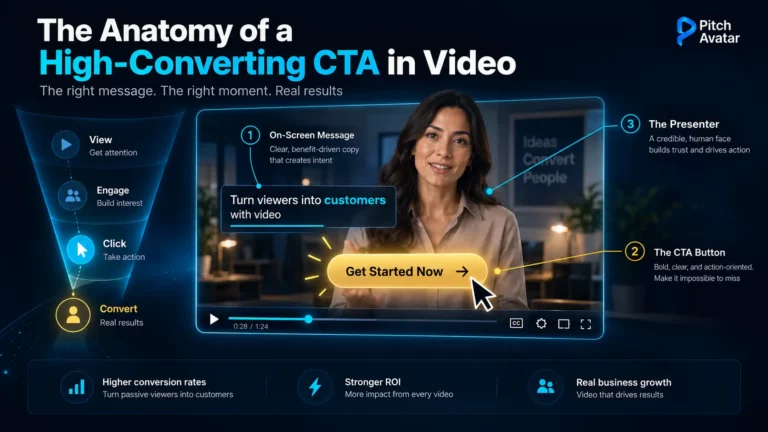
- Click-through actions: If you include a call-to-action button, track who clicked
For sales teams, this data transforms ultra-short presentations into qualification tools. A prospect who watches your demo three times is signaling buying intent – follow up immediately. A prospect who drops off after 15 seconds might need a different message or might not be a fit.
Pitch Avatar’s analytics dashboard provides this visibility automatically. Convert your PowerPoint to a trackable video presentation, send the link, and see exactly who engaged and when, so you follow up at the moment they’re most interested.
Integration with CRM and Sales Tools
The most effective ultra-short presentation workflows integrate with your existing tech stack. Engagement data flows automatically into your CRM, triggering follow-up sequences when prospects watch your content. For distributed teams managing dozens or hundreds of prospects simultaneously, this automation ensures no warm lead falls through the cracks.
Ultra-Short Presentation Templates and Examples
Template 1: The 60-Second Product Demo
Structure: 3 slides, 60 seconds total
- Slide 1 – The Problem (15 sec): “Sales teams waste 10 hours per week repeating the same demo for every prospect.”
- Slide 2 – The Solution (30 sec): “Pitch Avatar lets you record one demo with AI voice-over, then send a personalized link to every prospect – your demo runs 24/7 without you.”
- Slide 3 – The CTA (15 sec): “Try it free – upload your deck and get your first AI-narrated video in 5 minutes.”
Use case: Cold email outreach, LinkedIn messages, website demo pages
Template 2: The Investor Elevator Pitch
Structure: 4 slides, 90 seconds total
- Slide 1 – The Problem (15 sec): Start with a shocking statistic about your market’s pain point
- Slide 2 – Your Solution (30 sec): Explain your product in one sentence, then show how it works with a simple visual
- Slide 3 – Traction (30 sec): Share your key metric – revenue growth, user adoption, retention rate
- Slide 4 – The Ask (15 sec): “We’re raising $X to achieve Y milestone. Let’s talk.”
Use case: Demo day pitches, investor outreach, accelerator applications
Template 3: The Lightning Training Module
Structure: 5 slides, 3 minutes total
- Slide 1 – Learning Objective (20 sec): “By the end of this module, you’ll know how to [specific skill].”
- Slide 2 – Context (30 sec): Why this skill matters and when you’ll use it
- Slide 3 – The Process (60 sec): Step-by-step walkthrough with visuals
- Slide 4 – Common Mistakes (40 sec): What to avoid, with examples
- Slide 5 – Practice (30 sec): “Now try it yourself – here’s your exercise.”
Use case: Employee onboarding, microlearning programs, skills training
Let's Summarize
- Ultra-short presentations (1-3 minutes, 3-5 slides) address the reality that your audience doesn’t have time for 20-minute decks.
- Structure ultra-short formats: maximum 5 slides, maximum 3 key points, minimum 30-point font.
- Voice-over and AI Avatar presenters eliminate the need to record yourself repeatedly, making it practical to create personalized presentations.
- Async delivery via shareable links removes scheduling friction and scales better than live presentations for B2B teams managing global pipelines.
- Engagement tracking transforms presentations from one-way broadcasts into measurable assets – know who watched, for how long, and when to follow up.
To get the beneficial effect from direct communication with viewers when working with ultra-short presentations, use feedback and engagement tracking tools. If you need a polished ultra-short pitch that works 24/7 in multiple languages, explore AI presentation features that handle narration, delivery, and analytics automatically – so you create once and reach hundreds of prospects without repeating yourself.