The concept of an “AI Avatar” is so popular today that you can encounter it almost everywhere. But what does it really mean? If the word “Avatar” first makes you think of cartoonish characters from social media, it’s best to erase that image from your mind. That idea is as outdated as a rotary phone or a cassette tape.
The best way to understand what an AI Avatar is to imagine it as a “living portrait” or a “smart doll.” It’s a digital character that not only looks the way its creator set it up but also has a “brain” that allows it to independently “think”, speak, answer and interact with people. For the full definition, the main types and how businesses use them, start with our guide to what an AI avatar is.
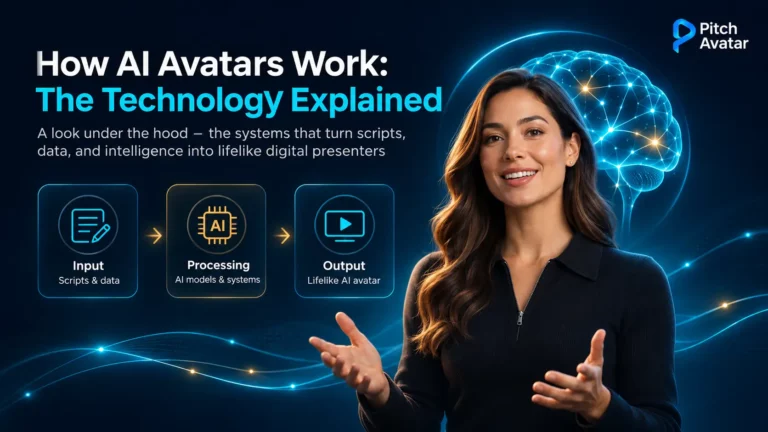
This article looks under the hood. We explain in plain language the four building blocks of every AI avatar, how an avatar is built step by step, the full pipeline from script to screen, why real-time avatars sometimes feel slow, and why some avatars look or sound wrong and how to fix it. A short glossary at the end covers the terms you’ll meet along the way.
Four Key Components of an AI Avatar

To provide a complete definition of an AI avatar, we’ve divided its capabilities into four main components. Each one is handled by a different kind of technology. The magic of AI avatar generation happens when all these parts work seamlessly together:
A Digital Representation (The Visual Body)
This is the visualization of the character (or, simply put, the “body” of the Avatar) that you see on screen. An AI avatar’s appearance can be almost anything: a photorealistic “digital twin” created from a person’s photo, a “living” Renaissance‑era portrait, a stylized 3D cartoon character, or even an abstract figure. Whatever the on‑screen embodiment of the avatar may be, it serves one essential function – it gives the AI a visual presence, allowing us to look at it during interaction, which makes communication feel more personal than talking to a faceless chatbot.
An AI Brain (The Intelligence Layer)
This is arguably the most crucial component. The “AI” in “AI avatar” refers to its level of intelligence, typically powered by a Large Language Model (LLM), the same technology behind systems like ChatGPT, Gemini, and Perplexity. This “brain” enables the avatar to understand questions, access information, reason, and deliver relevant, human‑like responses and reactions. Without this intelligence layer, the avatar would simply be a digital puppet, no different from the characters we control in video games.
Human-like Behavior (Simulated Expressions and Gestures)
A fully developed AI Avatar doesn’t simply read text mechanically – it communicates. AI technology analyses the text spoken by the avatar and adapts it to the chosen communication style. As a result, the speech becomes more human‑like, with natural variations in pace, pauses, and intonation that convey emotion. The avatar’s behavior is synchronized with its speech, including gestures, lip‑syncing, blinking, and even subtle facial expressions. This makes the AI avatar’s behavior highly convincing, further blurring the line between human and machine interaction. Advanced simulation of human behavior is a key distinction that modern AI models have over older technologies.
An Interactive Purpose (Designed to Communicate)
Finally, AI avatars are designed for direct interaction with people. They don’t simply voice texts; they hold conversations and keep a realistic dialogue with the person in front of them. They can answer questions addressed to customer support, conduct lessons in educational presentations, act as guides in virtual museums or serve as consultants in online stores. This interactivity is what sets AI avatars apart from passive non-player characters (NPCs) in games or simple animated videos.
How AI Brings an Avatar to Life: The Process Step-by-Step

Creating an AI avatar might sound incredibly complex, but modern platforms have made the process surprisingly easy for the end-user. Here’s a simple, non‑technical walkthrough of how an AI avatar works from start to finish.
Step 1: Data Input (Providing the Raw Materials)
Everything starts with an input. To create a custom avatar, a user typically provides a photo or a short video of themselves. For the conversation, the input is the script: the text you want the avatar to say. If you don’t want a custom avatar, you can simply choose a pre-made “stock” avatar from a library.
Step 2: Generative Modeling (AI Creates the Face and Voice)
This is where AI avatar technology truly comes to life.
- The Face: if you provided a photo, computer vision AI analyzes it to understand your facial structure. Then, a generative model creates a fully animatable 3D representation of your face.
- The Voice: the script is fed into a text-to-speech (TTS) engine, which generates a natural-sounding voiceover. Usually you can choose from multiple voices and tones, or use a cloned version of your own voice.
Step 3: Animation & Lip-Syncing (AI Makes It Move Realistically)
An avatar that speaks with a frozen face isn’t convincing, so this step is critical. Another AI model analyzes the generated audio and creates the matching mouth movements. It matches each sound (or “phoneme”) to the correct lip shape, a process known as lip-syncing. It also adds other natural movements like blinking and subtle head tilts.
The visible mouth shape for a sound is called a viseme. Several sounds share one viseme (for example “p”, “b” and “m” all close the lips), and the mouth already starts moving toward the next sound before the current one ends. Good lip-sync models learn this blending from real speakers; weaker ones jump from shape to shape, which is the “puppet mouth” effect many people notice.
Step 4: The Intelligence Layer (Connecting to the “Brain”)
For a simple video where the avatar reads a script, the process ends at Step 3. For an interactive AI avatar, such as a virtual support or sales agent, there’s one more step: the avatar is connected to an LLM. When a user asks a question, the LLM processes it, generates a new response in real time and sends that text back through Steps 2 and 3 to be spoken and animated. This loop is what makes a conversational AI avatar possible.
In business use, the LLM usually doesn’t answer from general knowledge alone. It first searches the company’s own documents (a knowledge base) and writes the answer from what it finds. This approach is called retrieval-augmented generation (RAG), and it is the main reason one company’s avatar can answer accurately about its own products.
Read more about how AI avatar agents use knowledge bases.
Overview of the Entire Process

Put together, a modern AI avatar runs through up to seven stages. Pre-generated presenter videos use the middle stages only; real-time conversational avatars use all of them, every time someone asks a question.
| Stage | What it does | Typical technology | What you notice when it's weak |
|---|---|---|---|
| 1. Input | Receives the script, slides or the viewer's question | Text, documents, microphone input | Answers to the wrong question |
| 2. Speech recognition (real-time only) | Turns the viewer's spoken question into text | Automatic speech recognition (ASR) | Misheard names and terms |
| 3. Language model | Decides what to say | LLM, often with retrieval from a knowledge base | Vague, invented or outdated answers |
| 4. Voice | Decides how it sounds | Text-to-speech, voice cloning | Flat delivery, wrong pronunciation |
| 5. Lip-sync | Moves the mouth to match the audio | Phoneme-to-viseme models | "Puppet mouth", lips drifting out of sync |
| 6. Face and body rendering | Produces the moving image | Neural rendering, video synthesis | Odd eyes, blur around teeth and hands |
| 7. Delivery | Plays the result to the viewer | Video file, or live streaming for real-time avatars | Long waits before the avatar starts speaking |
Pre-Generated vs. Real-Time AI Avatars

There are two ways an avatar can reach the viewer, and they behave very differently.
Pre-generated avatars (most presenter videos) are generated before anyone starts watching. Generation can take seconds or minutes, but viewers don’t have to wait: they simply launch the finished video. You can preview each piece before publishing, making this option a more reliable choice for marketing materials, training content, and compliance content.
Real-time avatars (conversational avatars) generate each answer on the fly. Every stage in the pipeline adds some delay: recognizing the question, generating the first words of the answer, producing the first audio and rendering the first frames. In everyday conversation people reply to each other almost instantly, so even a pause of a few seconds can make an avatar feel slow. Real-time systems reduce the latency by streaming: the avatar starts speaking the first sentence while the rest of the answer is still being generated. Short answers, clearly structured knowledge bases, and the ability to switch to text chat on slow internet connections all help make interactions more efficient.
A practical rule: use pre-generated avatars when your message needs to be carefully crafted, and live avatars when your audience’s questions are the focus.
Why Some AI Avatars Look or Sound Wrong (and How to Fix It)
Knowing the process makes it easier to fix the problems that viewers notice. These are the most common ones and what usually solves them:
| Problem | Where it comes from | What usually fixes it |
|---|---|---|
| Lips drift out of sync on long videos | Lip-sync over long, unbroken audio | Split long scripts into shorter scenes or slides |
| Product names and acronyms are mispronounced | Text-to-speech guessing unfamiliar words | Write names phonetically in the script, or use a pronunciation setting if the platform has one |
| Flat or wrong emotion | The voice model has little to go on in the text | Shorter sentences, clear punctuation, and a voice that matches the content |
| Eyes, blinking or teeth look "off" | Rendering limits; the uncanny valley | Choose a less photorealistic style |
| The avatar invents or guesses answers | The language model answering beyond its sources | Limit answers to the knowledge base and set a fallback such as "let me connect you with a colleague" |
| Answers are out of date | An old knowledge base | Give one person ownership of the knowledge base and a review schedule |
| Long pause before each answer | Delay added at every real-time stage | Streaming output, shorter answers and fast connections |
None of these are reasons to avoid AI avatars. They are quality checks to run before you add an avatar in front of customers or employees.
Read about how realistic AI avatars should be.
What You Need to Create a Custom Avatar

A custom avatar of a real person needs three inputs:
- Visual material: a clear photo or a short video of the person speaking toward the camera, in good, even light.
- A voice sample, if you want a cloned voice instead of a stock one.
- Documented consent from the person: what the avatar may be used for, in which channels and languages, for how long, and the procedure for revoking such consent.
Before you start, also check how the platform stores the photo, video and voice data, and whether it deletes them on request.
For the full creation process in Pitch Avatar, see how to generate an avatar.
Glossary of Key Terms
The world of AI is filled with jargon. Here are simple definitions for some of the most common terms you’ll encounter when learning about AI avatars. For deeper, more technical explanations, refer to specialized resources or documentation.
| Term | Simple definition |
|---|---|
| Generative AI | A type of AI that creates new content, such as images, text or voices, instead of only analyzing existing data. |
| Large language model (LLM) | The "brain" of the avatar. A large AI model, like the one behind ChatGPT, trained on huge amounts of text to understand and generate human-like conversation. |
| Retrieval-augmented generation (RAG) | A method where the LLM first finds relevant passages in a company's documents and then writes the answer from them. |
| Machine learning (ML) | Teaching computers to learn from data so they can make decisions or predictions without being explicitly programmed for every task. |
| Natural language processing (NLP) | The technology that lets computers understand, interpret and respond to human language, spoken and written. It's how the avatar "listens". |
| Automatic speech recognition (ASR) | Turning spoken words into text, so a real-time avatar can understand a spoken question. |
| Text-to-speech (TTS) | The technology that converts written text into spoken words, giving the AI avatar its voice. |
| Voice cloning | Creating a synthetic copy of a specific person's voice from recordings, so the avatar speaks in that voice. |
| Phoneme | The smallest sound unit of speech, such as the "p" in "pitch". |
| Viseme | The visible mouth shape for one or more phonemes. Lip-sync models map phonemes to visemes. |
| Lip-syncing | Matching the avatar's mouth movements to the sounds it speaks. |
| Computer vision | A field of AI that trains computers to "see" and understand images. In avatar creation, it analyzes a photo to build the avatar's face. |
| Latency | The delay between a viewer's question and the start of the avatar's answer. |
Putting It Together
An AI avatar is far more than a digital face. It joins a visual representation with an “AI brain”, animates it with human-like behavior, and does all of this for the purpose of interaction. It is this combination of graphics, animation and artificial intelligence that makes AI avatars a breakthrough technology.
AI avatars make interactions with computers more natural, accessible and engaging than before. As the technology develops, these digital characters will play a growing role in how we learn, work, communicate and entertain ourselves.
To see where they are already used, read our AI avatars use cases guide.
See all four layers working on your own content. Add an AI avatar presenter to your slides: book a demo or create your account.
Frequently Asked Questions
The “AI” is the intelligent “brain” behind the Avatar. It stands for Artificial Intelligence, which includes technologies that allow the Avatar to understand language, generate responses, and create realistic movements.
They are related but different. A virtual assistant is typically voice-only. An AI avatar adds a visual, human‑like presence to the assistant, making the interaction more personal.
“Generative” refers to the AI’s ability to create something new and original, rather than just analyzing existing data. It can generate a new human face, a unique voice, or a novel response to a question.
It’s connected to a large language model (LLM), like the technology behind ChatGPT. The LLM processes the user’s question and writes a relevant, coherent response for the avatar to speak. In business use, the LLM usually answers from a knowledge base that the company provides.
A real-time avatar has to recognize the question, write an answer, generate the voice and render the video before it starts speaking. Each step adds delay. Streaming the answer sentence by sentence and keeping answers short reduces the wait.
No. Many aim for photorealism, but avatars can also be stylized, cartoonish or abstract, depending on their purpose and the brand’s style
Lip-syncing is the technology that matches an avatar’s mouth movements to the spoken words. It’s one of the main features that makes an avatar look realistic and human-like.
Some advanced platforms can generate a face from a text description. Most common tools need a photo or video to create a custom avatar, or let you choose from a library of stock avatars.
Computer vision is a field of AI that lets computers “see” and interpret images. In avatar creation, it analyzes a photo, identifies facial features and uses that data to build the avatar’s face.