How B2B teams are swapping live intro calls for async demos created in Pitch Avatar, freeing reps and keeping the message consistent at any scale.
TL;DR: Initial intro calls are the most expensive, least scalable part of B2B sales, and buyers increasingly show less interest in them: 67% now prefer a rep-free buying experience, an increase from 61% a year earlier (Gartner). But entirely self-service options are not the full solution, as self-service buyers are 1.65 times more likely to regret the purchase. A hybrid approach offers the best results: a prospect watches an interactive, avatar-guided demonstration on their own schedule, and a sales representative intervenes when engagement data suggests it is time. Buyers who use a supplier’s digital tools along with a sales rep are 1.8 times more likely to close a high-quality deal. This guide explains why calls are becoming less popular, how to create an asynchronous demo, the intervention strategy for interpreting engagement signals, methods to ensure the demo is actually viewed, and situations where asynchronous demos are not effective.
Picture a typical day for a senior sales rep at a B2B SaaS company. The second coffee is already gone, and the calendar shows six demo calls. Three of them will unfold like this: “Hi, can you hear me? How about now? Better? Sorry, tech, you know how it is. Hang on, let me share my screen. Can you see it?” By the third call, the rep is tripping over their words and their right eye has started to twitch. By the fourth call, they deliver the company’s competitive advantages with the enthusiasm of an automated voicemail menu. The fifth prospect either asks to keep the presentation brief, or ends it early because their boss needs them. And the sixth doesn’t show up at all. Nothing personal: their schedule changed, and they simply forgot.
Sound familiar? Now add the fact that, for all that effort, the conversion rate barely improves. The classic B2B sales model has run out of road. Buyers and sellers both quietly dread the intro call: buyers don’t want to hand over half an hour of their day, and reps don’t want to be a broken record, playing the same pitch dozens of times a month.
So why continue with the old way? An AI avatar could become your sales team’s top performer. More precisely, it would be the team member handling most of the routine tasks before a deal closes. Imagine a sales presentation free of errors, fatigue, or the need to constantly reschedule meetings. Instead, you could send prospects an interactive video presentation hosted by an avatar; they can watch it at their convenience, on their own schedule, and in their preferred language.
This marks the beginning of a new era where async sales demonstrations actually drive B2B revenue growth. We will examine why live intro calls are losing appeal, what current research shows, and how to implement this process without a big budget.
Why B2B Buyers Avoid Phone Calls

Some sales leaders still picture buyers the way they did in the early 2000s: eager to chat with a charismatic salesperson before they know anything about the product. Today’s B2B buyer is different. They’re proactive, protective of their time, and want answers on their own terms. They prefer no small talk, no pre-call questionnaires, no endless Calendly ping-pong. They want to review your offer when they decide they have time for it.
Research supports this idea, but with a key difference.
Buyers want digital autonomy. Gartner’s 2026 sales survey showed that 67% of B2B buyers prefer a rep-free buying experience, an increase from 61% the previous year. McKinsey’s B2B Pulse research confirms this trend with its “rule of thirds”: across the journey, buyers want roughly the same choices (in-person interaction, remote engagement, or digital self-service) and many are willing to go through a significant portion of the purchase journey without interacting with anyone.
But completely self-service approaches can fail. Gartner’s B2B Buying Report found that buyers who complete a self-service digital purchase are 1.65 times more likely to regret their decision, and involving a sales representative in the digital purchasing process can reduce this regret by approximately half.
So the hybrid approach is more effective. The same research indicated that buyers are 1.8 times more likely to complete a high-quality deal when they use supplier-provided digital tools alongside a sales representative, rather than working through them alone. Gartner’s 2026 data reinforces it: 69% of buyers now consult a sales representative to confirm insights generated by AI.
Read those together and the conclusion is clear. Making a prospect fit into your rep’s calendar for a 15-minute overview costs you conversions. But handing them a video and disappearing costs you deal quality. What works is an on-demand pitch they open when they have a gap in their day, plus a rep who sees the engagement data and knows when to step in.
Trying to make a potential client schedule a 15-minute introductory meeting with your sales representative often reduces your conversion rates. But simply sending a video and then disengaging can hurt your deal quality. What works is an on-demand presentation clients can access when they have free time, combined with a sales rep who monitors engagement data and knows the right moment to get involved.
What an Async Demo Is, and Why It's Not a Forgotten YouTube Link
Mention an automated product demo and some executives picture a sad little scene: a 30-minute screen recording shared via an unlisted YouTube link. The prospect receives the email, opens it, sees the “38:12” runtime, and then closes the tab, promising themselves they’ll watch it later. Which, of course, means never.
That’s not what an async demo is. That is just another file no one will ever open. A real async sales demo is interactive and adapts to the viewer’s actions, which is where Pitch Avatar becomes useful.

Here’s the difference. Instead of asking reps to record themselves over and over (and look stiff on camera), you can take your best presentation and add a realistic AI avatar to it. This avatar then delivers your approved script clearly, in the style and tone you set, in multiple languages.
It does three jobs at once:
- Holds attention. The AI presenter guides viewers through the content with clear, attractive visuals.
- Gets viewers involved. Prospects don’t just sit and watch. They click links in the player, open a pricing calculator, download PDFs, or jump to the sections they care about.
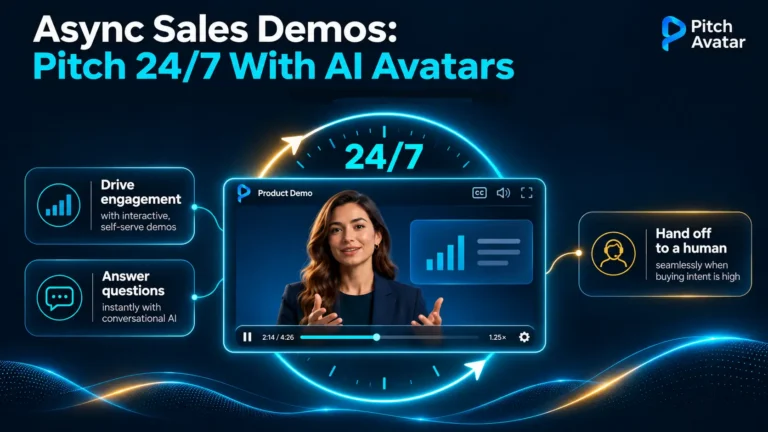
- Brings in a human when needed. If a viewer has a question the avatar can’t answer, they’re not left without help. They can click the call button (you can label it whatever suits your flow, from “Talk to a person” to “Ask an engineer”); the on-duty representative receives an alert and can join the session live within seconds.
The prospect receives an on-demand sales pitch without any pressure. You get a sales asset that works 24/7, without breaks or unproductive periods.
Where Async Demos Don't Work

Being honest about the limitations makes the rest of your claims believable. It also helps you avoid using this format for deals where it will not succeed.
- Complex discovery. Pre-recorded materials cannot uncover a prospect’s environment, limitations, or decision-making process if you do not already know them. Discovery requires a conversation.
- Custom scoping and technical fit. While a demo can show the architecture, it cannot confirm if your product will work with an unusual technical stack.
- Negotiation and pricing specifics. Any discussions about concessions, custom terms, or bargaining positions must involve a person who can make decisions.
- Highly regulated or high-sensitivity deals. In situations where procurement demands documented conversations and clear accountability, asynchronous communication acts as a supporting document and can’t be the primary process.
- Relationship-building with an economic buyer. A CFO signing a six-figure contract is buying confidence in your company, and this confidence is built through direct interaction.
The rule that holds: asynchronous tools provide explanations, but people make decisions. Use these tools for initial pitches, repeatable walkthroughs, and any part of the sales process you would otherwise repeat identically many times each quarter.
How to Create and Launch an Async Demo

Step 1. Script and structure: skip company history
Forget the 35-slide corporate deck that starts with the year you were founded. Async content has one strict rule: 3 to 7 minutes of pure value.
| Timing | Section | What to do |
|---|---|---|
| 0:00 - 0:30 | Hook and pain point | State your audience's biggest problem in the first seconds. Show you understand their daily headache better than they do. |
| 0:30 - 2:30 | Solution and result | Show the product in action. Skip the tour of 100 buttons: walk through one key function that solves the problem immediately. |
| 2:30 - 4:00 | Social proof | Include a short case study from a similar customer with clear numbers. |
| 4:00 - 5:00 | Clear next step | One simple CTA: get a quote, start a free trial, or book a technical deep dive. |
Just one CTA instead of four. Our guide on high-converting video CTAs explains where to place them and what words to use.
Step 2. Set up your AI avatar and voice
Upload your script or a finished presentation (PDF or PPTX) and create your virtual presenter:
- Pick the look. For conservative B2B sectors like finance, legal, and logistics, choose a professional business look. For tech startups and SaaS, a more casual style works well. You can create the avatar based on a real person or select one from the library.
- Choose or clone a voice. Select from a library of natural-sounding AI voices, or record a sample from your best salesperson and clone their voice. This lets you keep a familiar voice and personality, while giving your salesperson back their time.
- Go multilingual. Selling globally? Translate the presentation into multiple languages in minutes, with no hunting for native speakers to run intro pitches.

Step 3. Add interactivity
This is where a regular video becomes a sales tool:
- Clickable widgets. Add buttons on the slides leading to a sign-up form, an ROI calculator, or a whitepaper.
- Non-linear navigation. Let viewers skip the intro and jump directly to pricing or integrations.
- Real-time alerts. Connect to Slack or your CRM (HubSpot and Salesforce natively, plus hundreds of other tools through Zapier). When a prospect arrives at or spends time on the pricing slide, the on-duty rep gets notified and can message them in the player chat or join live.

Step 4. Personalize and share
An async demo shouldn’t just be a generic link sitting on your website. Instead, you can customize and share it in several ways:
- Account-based marketing. Create a personalized link for each target company, with a custom greeting on the opening slide (“Create for the Sales Inc. team”).
- Cold and warm outbound. Replace the “Do you have 30 minutes for a Zoom call?” question with “Here’s a 3-minute interactive demo you can watch when you have time.” People are much more likely to agree to this.
- CRM automation. Send the link automatically when someone fills out a form. While your rep is still on a coffee break, the prospect is already watching.

Step 5. Track, learn, and improve
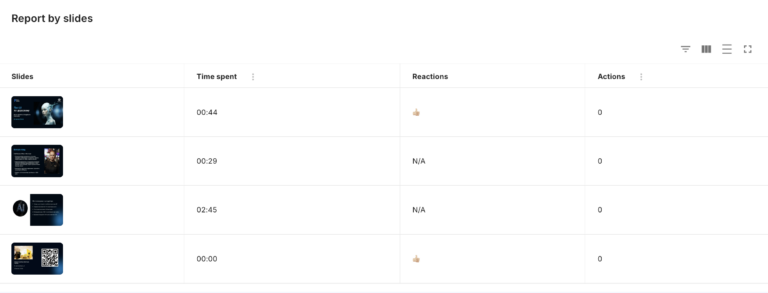
After a typical Zoom call, all you get is a vague CRM note: “Went OK, I think. They will contact us later.”. That’s guesswork. Asynchronous demos provide actual data: how much time each prospect spent on every slide, where they paused or replayed sections, and the exact moment they stopped watching. Use this to remove ineffective slides and clarify any confusing points.
Playbook for Engagement: Interpreting Viewing Signals

Here is the part most async demo guides miss. While all guides mention analytics, they rarely explain what to do with each signal. Data is only valuable if it changes a salesperson’s next move, since various viewing patterns can mean very different things.
| What the data shows | What it usually means | What the rep should do |
|---|---|---|
| Watched to the end, replayed the pricing slide | Serious consideration, working out affordability | Contact them within the hour, providing context on pricing and suggesting a next step. This is the strongest signal you will receive |
| Jumped straight to integrations or security | Technical gatekeeper checking feasibility | Send technical documentation, offer a call with an engineer instead of an account executive |
| Watched 80%+, no clicks, no reply | Interested but not yet ready to self-identify | Low-pressure follow-up message referencing a specific section they viewed |
| Opened, watched less than 30 seconds, never returned | Wrong fit, wrong timing, or an ineffective hook | Don't chase. Customize the opening 30 seconds for the next prospect |
| Opened repeatedly on different days | Being shared internally, or reviewed before a meeting | Ask who else should see it. Offer a version for their colleagues |
| Multiple distinct viewers from one company | The buying group is forming | Shift from selling to one person to enabling an internal champion |
| Reached pricing and left immediately | Price shock, or missing value context | Follow up with ROI framing before quoting again |
Two principles make this work in practice. First, speed is more effective than perfection – a short message sent within an hour of a strong signal of interest will perform better than a meticulously prepared one sent the next day. Second, refer to the specific content they viewed. Saying “I saw you spent time on the integrations section” shows you paid attention, something a general follow-up cannot do.
How to Get Demos Opened

Asynchronous demos typically fail at the sending step much more often than during viewing. Even a perfect three-minute demo that no one opens will perform just as poorly as sending nothing at all, and this is the aspect most teams consider least.
What increases open rates:
- State the length in your request. Describing something as “a 3-minute interactive demo” suggests a clear, brief commitment. A generic “demo link” can seem like it might take forty minutes.
- Promise one answer, not a tour. A message like “Here is how we handle multi-entity billing” is more effective than “here is an overview of our platform.”.
- Make the alternative explicit. Provide a clear alternative. Saying, “You can watch this whenever it works for you, or book 15 minutes with me if you prefer” gives recipients an option instead of demanding a slot on their calendar.
- Personalize the first screen, not just the email. A welcome message on the opening slide that mentions their company name immediately shows them this was not a mass email.
- Send it while their interest is still active. Automated sends right after a form submission perform better than a carefully crafted email sent two days later, because the prospect’s question is still fresh in their mind.
How B2B Teams Benefit

Async demos change the economics of your sales process and shorten the deal cycle.
Teams can expand without hiring additional staff. Delivering 100 good live demos daily requires a dozen sales representatives, managers to supervise them, and serious salary expenses. With asynchronous demos, the same setup can manage hundreds or thousands of views simultaneously, in every time zone, with consistent quality.
You get complete control over your message. How often do new employees misrepresent features, skip key benefits, or confuse pricing plans? A demo led by an avatar removes this risk: you approve one reference presentation with your product and marketing teams, and it gets delivered exactly as planned, every time. This benefit is measurable, not just a matter of neatness. Gartner found that buyers are 2.8 times more likely to finalize a high-quality deal when they perceive strong consistency between what sales representatives say and what the company’s official content says. Message inconsistencies among sales representatives are not a minor issue; they cost deals.
Sales representatives can save their energy for important discussions. They no longer need to act like tape recorders. Instead, they get involved once a lead understands the basics, has shown real interest, and is ready to discuss terms, integrations, and contracts (the same consistency problem shows up across a full buying committee, where each stakeholder hears a slightly different version of your case).
Summary
Buyers no longer want to adjust to another person’s schedule or wast time on lengthy presentations, whether live or on Zoom. They prefer to manage their purchasing journey on their own terms. But data clearly shows that leaving them alone leads to less profitable deals and increased dissatisfaction.
Moving to async demos doesn’t mean losing human interaction. It means focusing that interaction where it is most effective. You can assign the repeated initial presentation to AI, freeing your skilled staff to concentrate on what is important: building customer confidence and closing complex deals.
Your competitors are still trying to find time to call in three days. Your AI avatar is already guiding potential clients through your product, and your reps are actively closing deals.
Ready to try it? Book a demo or convert one of your existing presentations into an interactive, asynchronous pitch.
Frequently Asked Questions
This is a pre-recorded product demonstration that includes interactive elements. Potential customers view it when they choose instead of joining a live call. Unlike a basic screen recording shared with a link, a real asynchronous demo allows viewers to click through to other resources, move to the sections that interest them most, and contact a person if they have questions. At the same time, it provides the seller with data on what parts were actually viewed.
No, and the available data strongly advises against this. Gartner found that buyers who complete digital purchases entirely on their own are 1.65 times more likely to regret their decision. In contrast, buyers who use a supplier’s digital tools along with a sales representative are 1.8 times more likely to complete a high-quality deal. Asynchronous demos handle repetitive explanations, while sales representatives focus on discovery, negotiation, and building trust.
For an initial contact, it should be three to seven minutes long. Mention the duration when you reach out, because a specific, short commitment attracts much more interest than a link with an unknown length that could be forty minutes. If a topic requires more details, break it into several shorter demos instead of creating one long one.
When engagement signals intent. The strongest trigger is a prospect who watches to the end and replays the pricing slide – follow up within the hour. Other signals call for different responses: jumping to security or integrations suggests a technical evaluator who needs an engineer, while multiple viewers from one company suggests the buying group is forming and your contact needs enablement, not a pitch.
A salesperson should engage when a prospect’s interaction shows they are interested. The clearest indication is a prospect who watches the entire demo and then reviews the pricing slide – contact this person within the hour. Other types of interaction suggest different actions: If a viewer skips ahead to security or integration sections, they likely work as a technical evaluator and need an engineer to assist them. If several people from the same company watch the demo, it suggests a buying group is forming (in this case, your contact will need help with an internal presentation, not another sales pitch).
Completion rate, the time spent on each slide, how many times slides are replayed, the point where viewers stop watching, clicks on any embedded CTA, and the number of distinct people from one account who open the link. This last metric is often overlooked, but it is very important. It reveals if your main contact is sharing the demo within their company, which is usually the clearest indicator that a deal is moving forward.
No, they are not. These demos are effective for initial sales pitches, standardized product demonstrations, and any content you would otherwise present identically many times. They are not suitable for complex discovery phases, customized technical planning, negotiations, purchases in highly regulated industries, or when building relationships with a key decision-maker.