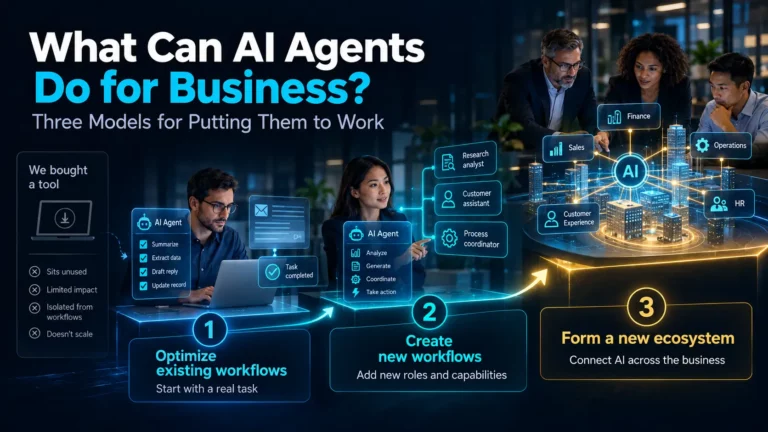
Let’s be honest: these days, a phenomenon known as “AI adoption for the sake of AI adoption” is quite widespread. Executives often chase a trend without a clear understanding of why they actually need artificial intelligence. It usually looks something like this: “Dear colleagues, here is a new expensive tool. Figure out how to use it in your work, because it costs money”.
TL;DR: Most companies now use AI, but very few have figured out what to do with AI agents specifically – agent deployment remains in the single digits across business functions, even as overall AI adoption nears universal use. The difficulty is not the technology itself; it’s beginning with “we bought a tool” instead of “we have this problem”. The most effective approach follows three models, sequentially. First, use agents to enhance work you already do (such as support, HR screening, and internal helpdesks). Next, create roles that did not exist previously (like personal AI assistants or context-aware client agents). Finally, let the value created reshape how the company operates. The following sections describe how agents differ from chatbots and RPA, the most valuable use cases by business function, the actual costs of deployment and when it pays back, the build‐vs‐buy decision, the risks that require management, and the metrics to measure success. Start with model one, using agents for a real task, and don’t skip ahead.
The result isn’t outright disappointment so much as a cooling of enthusiasm toward AI solutions in the business environment. This already happened with general-purpose generative AI, and a similar pattern is now emerging with agentic AI.
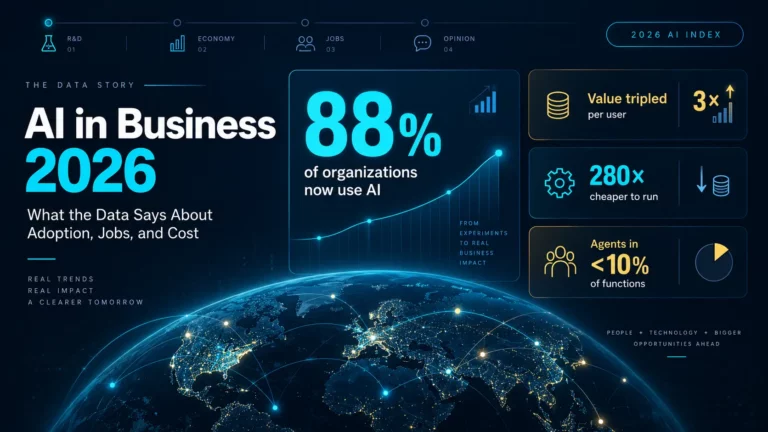
Data confirm this gap between adoption and usefulness. Organizational AI adoption has reached 88% of surveyed organizations, and 70% use generative AI in at least one business function – yet AI agent deployment remains below 10% in nearly all business functions (Stanford AI Index, 2026). PwC finds a similar split on returns: 79% of companies are adopting AI agents, but only 66% of adopters report measurable value. Companies are buying the technology, but it is not yet functioning effectively.

Many business leaders are confused. They realize that this is a complex and promising technology. They understand that it can be used effectively and profitably. But how exactly to apply it remains unclear.
(If you are still learning about the underlying technology, start with our explainer on what agentic AI is – this guide concentrates on how to implement the technology).
What Makes AI Agents Useful to a Business
AI agents were created to satisfy the particular requirements that businesses have for AI tools. Their main advantages come down to three things:
First, they are able to perform tasks that are typically assigned to people. Agents perform tasks, including communicating with other people at a professional level – not just answering a prompts, they execute entire assignments.
Second, they can be trained on specific business contexts. An agent operates within a particular field by using a dedicated knowledge base that it updates or expands over time. This specialized information separates a functional agent from a standard chatbot.
Third, they are flexible. Agents can be customized for specific departments, offices, employees, or clients. This includes personalizing content and adjusting for different languages or cultural settings.
All of this can now be quickly configured without writing code, using standard interface elements: buttons, icons, and drag-and-drop functionality.

Agents, chatbots, and RPA are not the same thing
Market confusion frequently arises when people consider three distinct technologies to be identical. The distinction matters because it determines where each creates value – and where each creates risk.
- A chatbot answers questions. It handles single-step interactions from a script or a knowledge base, and it waits to be asked.
- RPA (robotic process automation) performs repeated actions. It follows fixed, rule-based steps through software interfaces and breaks when the interface changes or an unexpected exception occurs.
- An AI agent works toward a goal. It combines reasoning, memory, and tools to perform multi-step tasks. It can adapt to new information and determine when an issue should be escalated.
Summarizing these functions: a chatbot responds, RPA repeats, and an agent acts. If the work you are automating consists of only a single question or a rigid sequence, you may not need an agent – and that’s perfectly acceptable.
So how do you convert those capabilities into business value? First, identify the specific tasks and problems in your company that AI agents can solve – and only then begin implementation. The most effective approach is to proceed through three models in sequence.
Model 1: Optimize and Transform Existing Workflows
This represents the simplest and most conservative way to implement AI agents. It serves as a suitable starting point, as it avoids risky or radical decisions. The primary idea is to use agents for tasks that your company already performs.
Customer and employee support are the most common examples, and for good reason – support teams handle standard requests with standard solutions, which are easy to store and expand inside an agent’s knowledge base.
It’s far from the only option, though. AI agents can conduct initial HR interviews and training sessions, act as virtual secretaries, staff an information desk, or assist legal and accounting teams. In short, agents are especially useful wherever routine communication is required (with employees or customers) in a professional, polite, and always available form.
Model 2: Create New Workflows
Once you have some experience, you can move to a more advanced and creative stage: building digital employees that perform entirely new functions inside your organization.
You should still start with a specific business need instead of an abstract question such as “Where else could we use AI?”.
A typical example at this stage is a personal AI assistant for each employee. This tool functions as a co-pilot and includes a knowledge base customized to a specific role. You can also create personalized AI support agents for clients that remember context and interaction history across multiple conversations.
The most important rule is that AI innovation must be integrated into existing workflows. If these tools are not integrated into daily tasks, employees will stop using them.
Model 3: Form a New Company Ecosystem
If Model 2 succeeds, the move to the next stage happens gradually and almost naturally. The usefulness of AI systems becomes evident enough to drive structural changes. This creates an environment in which each component of a business is directly or indirectly connected to AI tools and solutions.
A similar transformation already happened with computers and the internet. Businesses have moved from using disparate tools to integrating technology into all work processes. Companies that adopted these changes early stayed competitive, while those that did not lost their market positions.
In the same way, the thoughtful and structured implementation of AI agents today isn’t just a technological trend. It’s a long-term business strategy that will define success over the next ten years.

Where Agents Fit and Where They Don't
The single most common implementation mistake is assigning an agent to an unsuitable type of work. To determine suitability, consider whether the task is repetitive, rule-based, information-driven, and involves routine communication. Agents are not suited to tasks that require judgmental decision making, negotiation, original creativity, or high‐stakes emotional context.

Good fits:
- Answering recurring support and billing questions from a maintained knowledge base
- Screening and scheduling in the early recruitment stages
- Monitoring accounts or tickets to flag items that need human intervention
- Delivering standardized onboarding, training, and internal helpdesk information
- Qualifying inbound leads and routing them to the appropriate person
- Handling first‐line multilingual communication across different markets
Bad fits:
- Negotiating contracts or vendor terms, where bargaining position and judgment decide the outcome
- Original creative work – campaign concepts, design, positioning
- Managing sensitive HR conversations, escalations, and emotionally charged situations
- Making decisions with major legal, financial, or safety consequences that lack human review
- Anything where the underlying information changes faster than you can maintain the knowledge base
The pattern worth remembering: an agent works well for routine tasks but is unreliable for tasks that require judgment. Successful implementations create a clear hand‐off between these two areas rather than ignoring the distinction.
Highest Value Use Cases By Business Function
Most organizations achieve initial success in one of six areas. These areas are characterized by high work volume, repetitive patterns, and existing documentation, which are the conditions needed for automated agents to operate.
Customer support is the most frequent starting point and usually offers the fastest ROI. Agents answer frequently asked questions using a maintained knowledge base, categorize and route support requests, and pass complex issues to human agents. Typical metrics include ticket deflection, first-response time, and resolution rate.
Sales gains advantages from agent applications in lead qualification and response time. An agent that replies to an incoming lead within minutes, asks qualifying questions, and schedules meetings to address issues most teams are familiar with. Agents can also manage CRM systems and handle follow-up sequences.
HR and people operations can use agents for initial answers to policy and benefits questions (“how much leave do I have left?”), initial candidate screening and scheduling, and delivering onboarding materials. The required knowledge base typically exists as policy documents and FAQs.
IT service desks are well suited for agents that handle password resets, access provisioning, guided troubleshooting, and ticket creation for complex issues. This work is highly rule-based and includes clear escalation procedures that are appropriate to the agent’s capabilities.
Finance and procurement teams can use agents for invoice processing and data entry, answering questions about expense policies, and handling documents. Note the difference: agents perform well in invoice processing but are not suited for negotiating vendor contracts.
Internal knowledge management represents another area for agent application. An agent can give access to documentation, wikis, and process libraries, answering employee questions such as “how do we do X here?” at any time. This is often a less visible application, yet it consistently delivers value.
A common element across these areas is that each task involves communication and information rather than complex judgment. Currently, agents are reliably handling tasks of this kind.
What It Costs and When It Pays Back
The honest answer is that “an AI agent” spans two orders of magnitude in price, so the useful question is which tier you actually need.
- Off-the-shelf agent platforms typically run in the tens to low hundreds of dollars per user per month – the right choice for a scoped, single-purpose agent on a common workflow.
- Platform-native agents (the AI features already bundled in your CRM or productivity suite) often start around the low tens of thousands to configure properly. Worth checking first: most companies are already paying for capabilities they haven’t switched on.
- Custom-built agents run from roughly tens of thousands to several hundred thousand dollars for complex multi-agent systems, with healthcare and financial services at the top of the range because of compliance and auditability requirements.
The budgeting mistake almost everyone makes is modeling the build and ignoring what comes after. Ongoing operation – model API usage, hosting, monitoring, prompt tuning, and security upkeep – is a continuing monthly cost, and industry analyses consistently put initial development at only a minority of three-year total cost of ownership. Budget the TCO, not just the cost of building the system.
On returns, the benchmarks are genuinely encouraging where deployments are well-scoped. McKinsey’s 2026 analysis reports roughly 5.8x ROI within 14 months for well-scoped enterprise agent deployments, with a US enterprise average around 192%, and about 74% of organizations seeing ROI within the first year. Customer service and sales automation show the fastest returns; support agents commonly break even somewhere in the 6-18 month range.
Two caveats worth keeping in view. First, these are the figures from deployments that worked – recall that only 66% of AI-agent adopters report measurable value (PwC), so the average includes plenty that didn’t. Second, the organizations hitting those returns share three habits: they start from a defined, measurable workflow, they scope tightly before building, and they budget for the full multi-year cost rather than the build alone.

Build or buy?
Buying a platform is generally more cost-effective for an initial deployment. Ready-made platforms deliver returns within months, as they eliminate the development cycle and do not require extensive engineering resources. Custom projects require at least a year to achieve a return on investment. Developing your own solution is preferable in the long term if you need unique workflows, want to own the infrastructure, or plan to scale without the cost of licensing each user.
In practice, it makes sense to purchase ready-made software for standard tasks and develop your own to ensure the uniqueness of your business. You should purchase tools to perform routine tasks such as support, planning, and information retrieval where your needs are typical. Leave the development of customized solutions to those processes that give your company a competitive advantage. Most established organizations use a combination of both strategies.
Risks to Consider Before You Deploy
Agents differ from earlier automation models in one key way: they perform actions and communicate directly with customers on your behalf. This raises related risks.
- Accuracy and hallucination. If a customer‐facing agent gives wrong prices or policies, it creates a legal liability. You should base agents on a particular knowledge base rather than on general model knowledge. Test the system with non-standard situations and provocative questions before launching it.
- Data access and security. Agents need access to business systems to be effective. You must specify precisely what the agent may read, what it may write, and which systems it must not access.
- Human oversight. Design the system so that escalation is built in as a standard feature. The most effective agents handle routine tasks autonomously and pass exceptions to human staff. Set clear rules for when these handoffs happen.
- Auditability. Keep logs of each action the agent performs and the reasoning for those actions. You need to be able to reconstruct the sequence of actions if an agent changes a record or takes an action that impacts the customer.
- Disclosure. Tell users that they are interacting with an AI. This is standard ethical practice, and legal requirements for disclosure of AI-generated content are becoming increasingly stringent in regulated markets.
- Knowledge decay. An agent loses usefulness as its information becomes outdated. You should assign responsibility for keeping the knowledge base up to date before the system is launched, instead of waiting for the agent to provide incorrect information.
How to Measure Whether It's Working
Vague satisfaction is not a result. Choose metrics that align with the use case and benchmark them against your own pre-agent baseline:
- Support agents: containment or deflection rate, time to resolution, escalation rate, customer satisfaction.
- Sales agents: speed to first response, qualification rate, meetings booked, conversion.
- HR and IT agents: self-service resolution rate, ticket volume reduction, time saved per request.
- Across all of them: accuracy (how often the answer was right), cost per interaction, and adoption (whether people actually use it).
Where Content and Communication Fit
Agents deliver immediate value within the communication layer. That covers presentations, demos, onboarding materials, and client meetings. These tasks consume considerable time for skilled workers and follow predictable patterns.
That’s the part we focus on at Pitch Avatar: our AI Chat-Avatar is a conversational agent that can present your content, answer questions from a knowledge base, and qualify leads 24/7, in 70+ languages. This is a Model 1 use case that concentrates on routine communication instead of altering your entire business process. It can be implemented quickly. To learn more about how agent tools function for employee onboarding, read our guide to AI onboarding agents.
How to Start Without Wasting the Budget
If you want to avoid “AI adoption for the sake of AI adoption”, a straightforward sequence can help:
- Start from a problem, not a tool. Pinpoint a task that is repetitive, high-volume, and presently consumes the time of skilled employees
- Choose one Model 1 workflow – support, internal helpdesk, or first-line screening, and limit its scope.
- Build the knowledge base properly. The performance of an agent relies on the quality of the information it uses, and this is where most implementations fail.
- Define the process for transferring to a human before you launch, not after the first issue that requires escalation.
- Measure a concrete result – such as resolution rate, time saved, or response time, and compare it to your current performance rather than a vendor’s case study.
- Only then proceed to Model 2, once you have evidence and internal confidence.
Good luck with the successful implementation of AI agents!
Frequently Asked Questions
An AI agent is a software system that performs tasks for you instead of only answering questions. It operates within a specific context, uses a knowledge base that you manage, and communicates professionally. In a business environment, these agents typically handle support requests, screen job candidates, deliver training, or manage initial client communications.
Tasks that are repeatable and rely on information and routine communication are the best fit. These include recurring support and billing inquiries, early recruitment screening, onboarding, lead qualification, and multilingual first-line contact. Tasks that require judgment, negotiation, original creativity, or emotionally sensitive conversation are not suitable for agents.
Begin with existing work. Optimizing an existing workflow – typically customer or employee support – is lower-risk than inventing a new one, and it gives you evidence and experience before you expand. You should start with a specific problem rather than starting with a tool you purchased.
Projects often fail because they start from “we have this technology” instead of “we have this problem.” Statistics show this trend: while 79% of companies are adopting AI agents, only 66% of those adopters report measurable value. Agent deployment is still under 10% across business functions. Another common cause of failure is a weak knowledge base, as an agent is only as useful as the information it can access.
Costs vary significantly. Ready-made platforms cost between $10 and $100 per user each month. Implementing agent-specific features included in CRM systems or productivity suites typically costs between $10,000 and $30,000. The cost of developing custom solutions ranges from tens to hundreds of thousands of dollars for complex systems. Ongoing operations, including model usage, hosting, monitoring, and maintenance, are continuous costs. Industry analyses indicate that initial development is only a small part of the total cost of ownership over a three years period.
Benchmarks for well-defined deployments are high. An average ROI of 5.8x within 14 months. The average return for US enterprises is near 192%, and about 74% of organizations see returns within one year. Customer service and sales have the fastest payback periods. However, only 66% of adopters report measurable value. These averages represent projects that were properly planned and maintained.
Buying a platform is usually better for a first deployment. Platforms provide returns in months and require fewer engineers. Building is more effective later, when you need proprietary workflows and want to avoid per-seat costs as you scale. A ready-made solution is worth purchasing for solving typical problems. For specific processes that will help your company remain competitive, you should develop your own solution.
A chatbot provides answers to single questions using a script or knowledge base. RPA follows fixed, rule-based steps and stops if it encounters an exception. An AI agent performs actions by combining reasoning, memory, and tools to complete multi-step tasks. It can adapt to new information and escalate issues to humans when necessary. If a task involves only one question or a rigid sequence, you may not need an agent.
Not for most business use cases anymore. Modern platforms allow you to set up agents using buttons, icons, and drag-and-drop interfaces. You can adapt them to specific roles or languages without writing code. The main challenges are organizational: choosing the right task, managing the knowledge base, and determining the order of transferring work from the agent to the human.