These days, when every process moves fast, new employees no longer want to read a hundred-page PDF filled with company policies and standard operating procedures (SOPs). They need to quickly understand how things work, what their role and responsibilities are, who’s who, and where to go with questions, ideas, or problems.
TL;DR: New hires don’t read hundred-page onboarding PDFs, and dense text is a weak way to learn job responsibilities anyway. Short AI-generated video “chapters” (one topic each, 60-180 seconds) replace static manuals with a format that’s more engaging, personalized by role, and easy to keep up to date. The business case is clear: only 12% of employees believe their company does a good job of onboarding new employees (Gallup), yet good onboarding increases retention by 82% and productivity by more than 70% (Brandon Hall Group). Important note: video is for educational and informational purposes only, not for reference purposes – keep legal and compliance materials (contracts, benefits tables, org charts) in searchable text format. The most effective onboarding program uses both approaches: video for training and text for information retrieval.
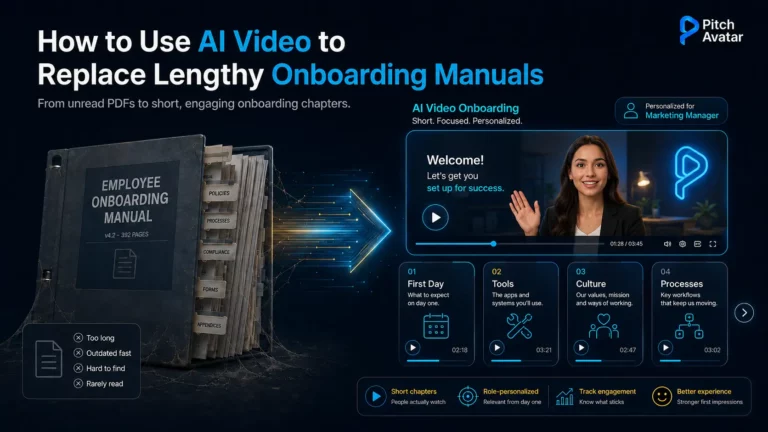
The era when the onboarding process stretched over six months or more is long gone, and thick manuals and instruction books have gone with it. AI-generated videos with short, structured chapters replace all of this with a dynamic, personalized, and easily updatable format for onboarding and learning. This is a natural extension of the changes we cover in our guide to AI onboarding videos and presentations, applied specifically to the documents most companies still rely on.
Can AI video replace onboarding manuals?
Yes, for most training and introductory materials. Short, AI-generated video chapters explain a role, a tool, or a process faster and more memorably than a hundred-page PDF, and they’re far easier to keep up to date. The exception is reference and legal material (policies, contracts, benefits tables), which should be left in searchable text format. The most effective onboarding program uses both approaches: video for training and text for information retrieval.
Why this isn't a trend, but a necessity

This isn’t just a technological fad. It’s an answer to a real business problem.
Many companies lose employees during the onboarding process. Gallup research shows that 12% of employees strongly agree that their organization provides effective onboarding for new hires. Approximately one third of new hires leave their positions within the first 90 days. Research from Brandon Hall Group indicates that a strong onboarding process improves retention by 82% and increases productivity by more than 70%. Our AI onboarding ROI analysis provides a detailed explanation of the financial data behind these figures.
Traditional documents prove ineffective in most situations. Few people have the time or motivation to study them carefully, let alone read them to the end. And, to be honest, HR teams themselves often lack the time to create, maintain, and update them properly.
Why traditional PDFs and manuals no longer work
New employees have to spend hours reading complex texts during their first month on the job, but text is one of the weakest ways to retain information. People skim it, read it in fragments after work or during breaks, and forget most of it. Even a couple of specially set days are rarely enough to fully understand and remember everything.
In the past, this problem was partly solved by long onboarding programs with internships and practical training. Paper documents played only a supporting role. They didn’t provide real-time answers to questions or adapt to different roles – that was the job of mentors and HR specialists. Today, most companies no longer have the resources for that approach.
There’s also the rise of remote and hybrid work. A significant and growing share of new employees are now starting work in virtual or hybrid environments, where traditional “in-person” onboarding is becoming difficult or even impossible.
HR teams are overloaded too, spending a significant amount of their time answering the same repetitive questions from new hires – time that could be saved with structured video.

Why video onboarding works better
Video is one of the most effective ways to solve this. People consistently remember and comprehend well-produced videos better than complex text, which is why industries such as aviation, nuclear energy, and elite education have long invested in professional educational videos. The main limitations were always cost and production time. Even when filming became cheaper, quality often suffered, which reduced their effectiveness.
Only AI development has finally made high-quality video production scalable, fast, and affordable. Here’s how the two formats compare for onboarding:
| Type | PDF manual / SOP | AI video chapters |
|---|---|---|
| Engagement | Often skimmed or unfinished | Higher; most employees prefer video |
| Retention | Weak from complex text parts | Stronger from visual, step-by-step instructions |
| Updates | Slow, manual edits | Update the script, regenerate |
| Personalization | One version for everyone | Role-specific paths and greetings |
| Remote fit | Passive, no guidance | Works for virtual and hybrid environments |
| Reference and search | Easy to search | Harder to scan (pair with text) |
| Enterprise relationship management | Human | Trust and emotional connection drive large deals |
| Creative brainstorming and strategy | Human | Original thinking, not just copying existing patterns. |
| Escalated support (angry/confused customer) | Human | Empathy and judgment for emotionally complex situations |
| Webinar or event hosting (with live Q&A) | Human + AI avatar | Human hosts the live discussion; avatar is responsible for the structured presentation |
How AI video transforms onboarding
Modern AI video platforms make it possible to create professional videos without studios or large production teams.
With Pitch Avatar, a text script can become a video in minutes, with avatars that speak 70+ languages, with accurate lip sync, facial expressions, and gestures. These avatars can represent real people (such as CEOs or HR managers) or completely virtual characters, and they can even bring company mascots to life. Editing, localization, and personalization are as simple as updating a script and clicking a few buttons.
The result: onboarding becomes a structured video guide consisting of short videos lasting 60-180 seconds. Each topic, question, or process becomes a separate chapter.

What AI video can't replace
Video isn’t the right format for everything, and pretending it is undermines trust. Keep this information as searchable text (with short video summaries where they help):
- Legal and compliance content – policies, contracts, and privacy notices that may need to be referenced explicitly.
- Reference material – benefits tables, pay schedules, and org charts people look up rather than watch.
- Fast-changing details that need quick edits by staff who don’t produce video.
The most effective onboarding program uses video for training and orientation and text for information retrieval. Treat them as partners, not competitors.
What the research says
- Only 12% of employees strongly believe that their organization does a good job of onboarding new employees.(Gallup).
- Effective onboarding increases employee retention by 82% and productivity by more than 70% (Brandon Hall Group).
- 72% of employees say video improves the onboarding experience (Brightcove).
- Nearly a third of newly hired employees quit their positions within their first 90 days, much of it avoidable with better onboarding (Jobvite).

Step-by-step transition from PDF to AI video
- Audit existing materials. Collect all SOPs, policies, and instructions, and update them.
- Break content into logical blocks. For example: First Day, Tools and Access, Company Culture, Key Processes, Responsibilities, and Benefits.
- Create a video structure. Each video should answer one specific question. Add timestamps, chapters, and navigation. Ideal length: 30 seconds to 3 minutes.
- Build personalized video packages. Generate role-specific onboarding paths for sales, development, support, and other teams. Add personalized greetings from managers, and assemble a personalized journey for each employee. (More on this in our guide to personalizing new-hire onboarding with AI.)
- Add interactivity. Quizzes, checklists, and conditional paths (“If you work remotely, watch this section”) increase engagement. You can also add an AI avatar assistant as a 24/7 guide – though the human element still matters, as we discuss in finding the AI-human balance in onboarding.
- Publish and integrate. Use videos in your LMS, internal portals, or collaboration tools like Slack or Teams, with tracking turned on.
Best practices for 2026
- Start onboarding with a welcome video from the CEO or manager.
- Add subtitles for accessibility and silent viewing.
- Localize content for all company languages.
- Assign clear responsibility for keeping content up to date.
- Check avatars for unnatural behavior or “uncanny valley” effects.
- Track key metrics such as completion rate, time to productivity, and employee NPS.
Companies implementing AI video onboarding report significant reductions in HR workload and increased employee engagement within the first week – two results that HR leaders notice most quickly, though exact metrics vary by organization, so compare results to your own baseline.
Conclusion: From static documents to dynamic onboarding
Companies that continue to rely on lengthy manuals and static documents are increasingly losing ground in the competition for talented employees.
AI video onboarding is not just a replacement for PDFs. It represents a broader shift in HR, from document management to an active, human-focused support system for employees. Combined with personal AI assistants, this approach can support employees throughout their entire journey in the company, from onboarding to long-term development. For a more complete understanding of where this is all heading, see our guide to AI onboarding agents.
Onboarding is the best place to start. It delivers fast, visible results: faster adaptation, higher retention, and reduced workload for HR teams. From there, the transformation can continue across the entire employee experience.
Ready to turn your onboarding manuals into video? Start creating with Pitch Avatar.
Frequently Asked Questions
For most training and introductory content, yes. Short video chapters explain roles, tools, and processes faster and more memorably than a long PDF, and they’re easier to update. Keep reference and legal material (policies, contracts, benefits tables) in searchable text format, and use video for anything typically taught in person.
Each video should focus on one topic and be approximately 60-180 seconds long. Short “chapters” with timestamps and navigation let new hires find and rewatch exactly what they need.
Employees confirm this: 72% say video improves the onboarding process. People also remember and comprehend step-by-step instructions with voice guidance better than dense text, especially for “how to” content.
Anything that needs to be searched, accurately quoted, or that is constantly changing: legal and compliance documents, contracts, benefits and pay tables, and org charts. Combine them with short videos, but keep the source of the information in text format.
Track survey completion rates, time to productivity, employee NPS (eNPS), and HR time saved on answering repetitive questions. Watch where viewers drop off in each chapter and prioritize improving those sections.