Whether you’re building a sales deck, a product demo, or a training module, the format of your online presentation directly impacts whether it gets watched or ignored. Traditional slide decks created in PowerPoint or Google Slides often fall flat when shared digitally: no narration, no interactivity, no way to track engagement.
Below are 5 simple rules for creating promotional and sales content from the Pitch Avatar team – plus practical guidance on how to turn static slides into interactive video presentations that actually help build a sales funnel.
An online presentation should be primarily designed for viewing on mobile devices
The number of people using smartphones and tablets as their main means of accessing the Internet is continuously increasing. Therefore, when creating content – whether an online presentation or otherwise – it’s important to consider the mobile device as the primary tool for viewing. However, it’s also essential to ensure that the presentation remains comfortable to view on a desktop.
An online presentation should be interactive
The viewer should be able to interact with the content and the presenter. Make sure to include an interactive component in the presentation script. For example, prize contests or special slides with which the viewers should perform various manipulations. At the same time, viewers should always get a reaction to their questions and comments – even if they are watching the presentation in a recording. To do this, you need to use AI assistants that can communicate with the audience independently.
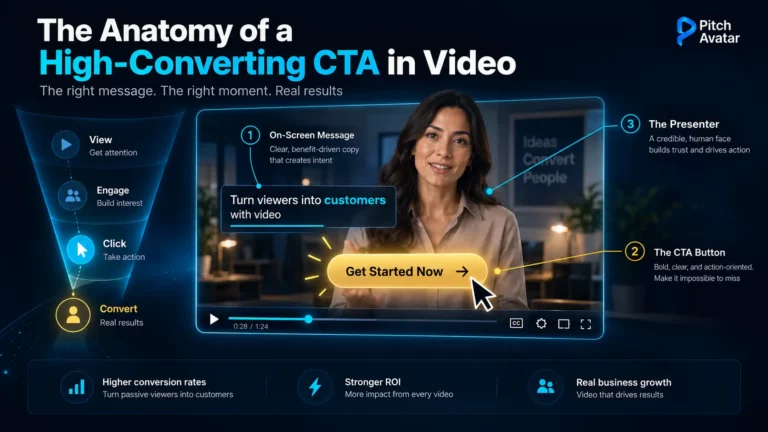
For B2B teams, interactivity goes beyond polls and quizzes. The ability for a prospect to call the presenter, schedule a meeting, or fill out a lead form during the online presentation is what turns a passive viewing experience into a conversion event. Winning over your presentation audience means giving them ways to act on their interest in real time.
The online presentation should be short
We recommend a maximum duration of 3 to 3.5 minutes, excluding communication with the audience. The days of commercial online presentations lasting dozens of minutes are over. Nowadays, 20 minutes is considered the length of a webinar, not a presentation. To put it in perspective, ask yourself when the last time you willingly watched at least 10 minutes of promotional or sales content was?
For more data on how length impacts viewer retention, see our guide on optimal presentation duration.
An online presentation should be based on video, not static images
Moving visuals capture attention more effectively than static ones. Today, creating videos and animations is easy with the help of content generators powered by artificial intelligence. Be sure to take advantage of these services and applications.
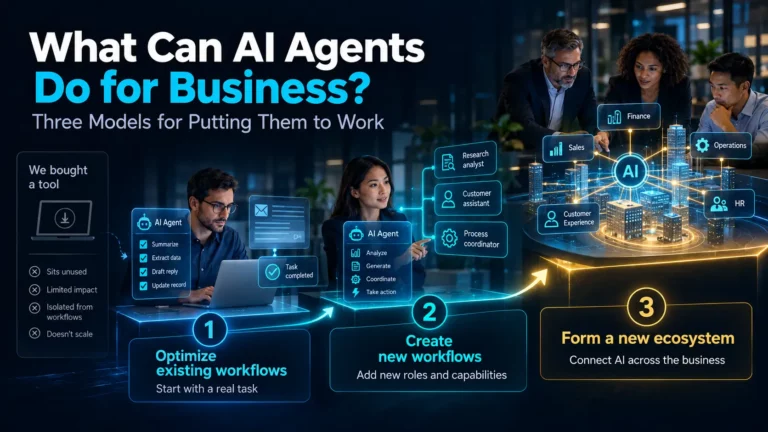
Better yet, combine video with an AI avatar that will voice each slide. This approach means you don’t need to record yourself on camera – the AI handles delivery while you focus on the message. You can convert your PowerPoint or PDF into a video presentation in minutes.
An online presentation should be error-free
Today, there’s no need to struggle with public speaking and on-camera work if it’s not your strength or preference. Mistakes such as hesitations, incorrect intonation, and uncertain behavior can spoil the impression of online content and diminish its commercial effectiveness. Every presentation can be perfected using AI assistants. With this tool, you can create a virtual presenter based on a real person’s photo and voice, or design a fictitious speaker. The AI will deliver the text flawlessly with the appropriate pace, intonation, and language of your choice.
Where traditional presentation tools fall short
Tools like PowerPoint, Google Slides, Keynote, and Prezi are great for creating slides. But when it comes to delivering an online presentation (especially asynchronously to prospects, leads, or remote teams), they leave major gaps:
- No engagement tracking: You send a PDF or share a link, but you have no idea if the recipient actually watched it, which slides held their attention, or when they dropped off.
- No built-in voice-over: Static slides without voice-over or video lose context the moment someone views them without you present.
- No personalization at scale: Creating a custom version of your deck for each prospect or audience segment means duplicating work.
- No async interactivity: There’s no way for a viewer to ask a question, book a meeting, or fill out a form while viewing a traditional slide deck.
- No multilingual delivery: Translating and re-recording slide decks for global teams is time-consuming and expensive.
This is where the format of a modern online presentation diverges from the traditional slideware approach. Pitch Avatar starts where PowerPoint and Google Slides stop – turning static content into interactive, trackable, video-driven experiences.
Online presentation tools compared: slides vs. interactive video
| Feature | PowerPoint/Google Slides | Prezi/Canva | Pitch Avatar |
|---|---|---|---|
| Slide creation & templates | ✅ Extensive | ✅ Extensive | Import existing PPTX, PDF, or Google Slides |
| AI-powered design suggestions | ✅ Copilot/Gemini | ✅ Built-in AI | AI script generation |
| Video voice-over with an AI Avatar | ❌ | ❌ | ✅ AI Avatar deliver content on every slide |
| Async viewer engagement (call presenter, book meeting) | ❌ | ❌ | ✅ Built-in lead forms, meeting scheduler, live call |
| Engagement analytics (per-slide view time, drop-off) | ❌ | ❌ | ✅ Detailed session analytics |
| CRM integration (HubSpot, Salesforce) | ❌ | ❌ | ✅ HubSpot, Salesforce, Zapier |
| Personalization (custom links per prospect) | ❌ | ❌ | ✅ Personalized welcome slides + links |
| Multilingual delivery | Manual translation | Manual translation | ✅ 70+ languages with AI dubbing & voice cloning |
| Real-time collaboration on slides | ✅ | ✅ | Partial (import from collaborative tools) |
| Offline editing | ✅ | Limited | Cloud-based; shared links are viewable anywhere |
The takeaway: if your goal is creating beautiful slides, traditional presentation software does the job. If your goal is to deliver an online presentation that generates meetings, captures leads, and works 24/7 without you – you need a different format entirely.
Online presentations for revenue teams: Key use cases
The biggest gap in most presentation software recommendations is that they focus on creating slides, not on achieving business results. Here’s how B2B teams are using the interactive online presentation format to achieve real results:
Sales outreach and prospecting
Instead of attaching a PDF to a cold email, send a personalized presentation with an AI avatar that greets the prospect by name. You get notified the moment they start watching, and the prospect can call you or book a meeting right from the presentation. It’s async outreach that feels personal.
Product demos and presales
Record your demo once with an AI avatar presenter, then share it with every inbound lead – 24/7, across time zones. Catch clients for demo calls by letting the online presentation do the heavy lifting before your team jumps on a live call.
Sales enablement and training
Standardize your messaging across the sales org with online presentations that deliver the same pitch, the same way, every time. Sales enablement teams use this format for onboarding new reps and ensuring consistent messaging across regions.
Global training and onboarding
Create a training presentation once, then localize it into multiple languages with AI dubbing and voice cloning. Corporate learning teams use this to scale onboarding without re-recording content for every market.
Marketing content and Lead Gen
Embed interactive online presentations on landing pages, in email campaigns, or on product pages. The built-in lead forms capture viewer data directly into your CRM. Marketing teams use this to turn static content into measurable lead-gen assets.
How to get started: turn your slides into an online presentation
You don’t need to start from scratch. Pitch Avatar works with the content you already have:
- Upload your existing slides. The platform accepts PDF files, MP4 videos, YouTube links, and content from PowerPoint, Canva, and Keynote.
- Generate or paste your script. Use AI to generate a script, or input your own talking points for each slide.
- Choose your AI avatar and language. Pick from a library of pre-made characters or create a custom avatar from any photo. Select your language and voice.
- Add interactivity. Include lead forms, meeting booking options, FAQ navigation, and the option for viewers to call the presenter.
- Share your link. Send personalized links via email, LinkedIn, or embed the presentation on your website. Track every session with built-in analytics.
Want to keep your audience engaged from first slide to last? Check out our techniques to attract and retain an online presentation audience.
Good luck, success, and high income!