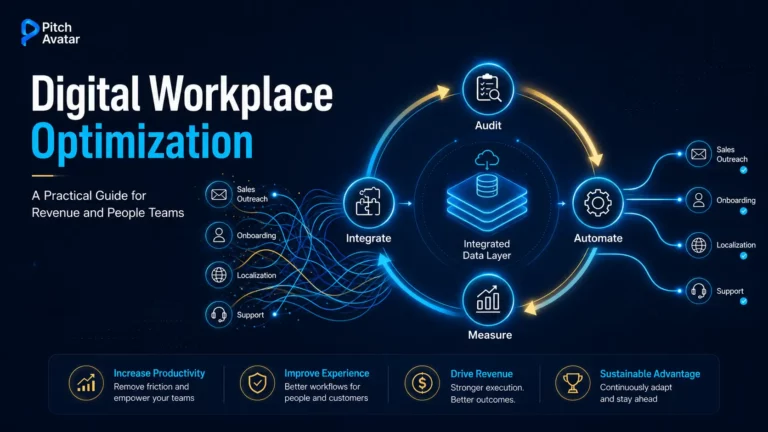
TL;DR: Digital workplace optimization is the ongoing process of removing barriers in the tools, workflows, and communication systems your teams use. Evidence of effectiveness is measurable: employees report working at only 60% of their potential using current digital tools, knowledge workers lose approximately four hours per week just refocusing after switching to other applications, and 36% have considered quitting due to a poor digital experience. The solution isn’t adding new tools, but in creating a closed feedback loop: audit the most problematic workflows (sales team interactions, new employee onboarding, localization, support), automate repetitive communication work, integrate the remaining work, and continuously measure engagement. This guide explores the problems, best practices, most effective use cases, and the fair role of AI.
Employees are using existing digital tools at only 60% of their potential productivity – not because the tools don’t exist, but because they are fragmented, used inconsistently, and rarely optimized for the work processes that actually drive revenue. Meanwhile, the digital workplace market is projected to reach $161.82 billion by 2030 from $67.57 billion in 2025, growing at a 19.1% CAGR. Organizations that succeed in this market don’t just implement more tools. They systematically remove barriers in work processes that enable growth: interaction with the sales department, onboarding new employees, training, and customer communication.

This guide is written for HR leaders, L&D managers, sales enablement teams, and demand gen managers – the people responsible for the work processes that actually advance the sales funnel, reduce time to market, and scale communications across markets. If you’re looking to do more with less (reach more markets, onboard new employees faster, close more deals), digital workplace optimization is how the best teams are doing it.
What Is Digital Workplace Optimization?
Digital workplace optimization is the ongoing process of identifying and removing barriers in the tools, workflows, and communication systems employees use to accomplish their tasks – with the goal of improving measurable results such as productivity, support ticket processing speed, adoption rate, and content engagement.
Markets and Markets defines the digital workplace market as “the integrated suite of IT services that enable organizations to deliver a secure, seamless, and productive employee experience across all work environments – in-office, remote, or hybrid”. Optimization builds on this principle and asks questions: Do these services actually work? Are they achieving the results we need?
For most organizations, the honest answer is: not entirely. The current “everything as a service” trend has shifted focus to combining key digital platforms, tools, and ongoing support into service offerings that improve operational efficiency. But implementing such services is only the first step. Optimization is what happens after implementation: a continuous process of measuring, adjusting, and improving.
For Pitch Avatar’s customers (sales teams, HR and L&D leaders, marketing managers, and customer success teams), optimization means something specific. It means eliminating the manual, repetitive workflows that prevent sales and HR teams from operating at scale to meet market needs. It means turning static presentations into trackable, interactive resources. It means delivering consistent, personalized communication in multiple languages without re-recording every video from scratch. This means understanding what content works and what doesn’t, and adjusting accordingly.
Digital workplace optimization is not a one-time project. It’s a feedback loop – a continuous cycle of measurement, iteration, and improvement applied to the most critical work processes.
Why Digital Workplace Optimization Is a Business Priority
The Hidden Friction Points Slowing Your Digital Workplace
Most organizations are aware that problems exist. Far fewer have formulated them precisely enough to solve them. Here are the most problematic issues for sales, marketing, HR and customer service teams.

Tool Fragmentation and App Overload
The average knowledge worker switches between dozens of applications daily – and the cost is quantified. A Harvard Business Review study that tracked 137 employees across three Fortune 500 companies found workers toggled between apps and websites roughly 1,200 times per day, spending just under four hours per week simply reorienting themselves after switching – about 9% of their total work time. Add to this the search problem: McKinsey analysis found that knowledge workers spend about 1.8 hours every day searching for and gathering information. Fragmented tools not only slow down work – they create inconsistencies and data silos, making performance measurement impossible.Manual Communication Problems
Sales teams re-recording the same demo for every prospect. HR teams re-recording onboarding videos every time company policy changes. Marketing departments create one piece of English-language content and then rush to localize it for five markets. These are manual, repetitive communication tasks that take hours from skilled professionals and produce inconsistent results. They’re also the most obvious targets for automation.Localization and Global Reach Gaps
Content created in one language leaves multilingual markets underserved. Training materials intended for English-speaking employees only. Sales presentations that can’t be delivered to prospects in their native language without significant production costs. For organizations operating across multiple regions, localization gaps are a direct revenue and productivity constraint.Limited Personalization
Sending the same standard presentation to every prospect. Delivering the same onboarding materials for every new employee, regardless of position, region, or language. Tools for personalization at scale exist, but most teams haven’t created workflows to use them systematically.Outdated Infrastructure and Disparate Systems
Outdated infrastructure, disparate systems, and fragmented tools are the most common barriers to digital workplace modernization. Efforts to modernize are often slowed by the difficulty of integrating new technologies into outdated environments. And when teams become isolated from each other, tool and license fragmentation follows, reducing productivity and increasing vulnerability.Technostress from Technological Overload
As digital technologies become more complex, so does employee stress. Splashtop identifies technostress (anxiety caused by the need to keep up with technological change) is a growing problem in 2026, especially as AI adoption accelerates. Organizations that add tools without removing barriers are not optimizing the digital workplace; they are making it worse.Best Practices for Digital Workplace Optimization

Build a Unified Communication and Content Framework
Teamwork is the most important element of any cohesive team. Without seamless collaboration, it’s difficult to get anything done – but in a digital environment, there are no spontaneous meetings around the coffee machine or lengthy brainstorming sessions in the office.
Clearly defined tools and practices ensure the flow of ideas and information. They help employees share information and communicate with each other, document ideas and solve problems. Your organization needs functional SOPs that optimize workflow efficiency and meet your business needs.
For communication tools specifically, platforms like Slack and Microsoft Teams create dedicated work groups where managers can check progress without waiting for individual email updates. Collaboration tools like Trello allow team members to post tasks on a shared board, provide feedback, suggest solutions, and respond to questions immediately. This leads to better engagement and helps teams achieve both individual and collective goals.
The right digital workplace tools don’t just prevent problems – they actively support results. For sales teams, this means tools that transform static presentations into personalized videos with the ability to track results. For HR teams, it means platforms that localize onboarding content into multiple languages without re-recording. For marketing, it means converting existing assets (PowerPoint presentations, PDFs, product demos) into interactive materials that integrate directly into CRM. The question is not just, “How secure are our tools?” but, “Do our tools actually impact the metrics that matter?”.
Automate Repetitive Communication Tasks
Workflow automation is one of the highest-leverage levers available. Automating routine communication tasks (follow-up sequences, demo delivery, onboarding modules, support content) frees skilled professionals to focus on work that requires human judgment.
Optimization isn’t a one-time project – it’s a closed feedback loop. The most effective teams use engagement analytics to understand which content is working: which slides hold attention, where viewers lose interest, which demos lead to meetings, and which localized versions outperform the original. This data-driven approach to content performance is what separates teams that optimize once from teams that optimize continuously.
Develop Effective Policies
Digital workplaces benefit from policies that optimize processes – guidelines for virtual meetings, minimum and maximum online hours, communication norms, and content management standards. Policies that regulate the digital space eliminate uncertainty and increase productivity.
It’s crucial to maintain employee independence to ensure better creativity. You’ll have to balance between organizational policies and the freedom of action given to your employees.
Integrate Tools to Eliminate Silos
Cloud data storage solutions are ideal for companies looking to scale their information management systems. They do not require additional equipment installation, and the storage capacity can be expanded as needed. These systems are accessible worldwide (you can log in anytime, anywhere), and they free up employee workstations from the need to store data on their own computers.
Beyond data storage, integration is the key to eliminating silos. Tools that integrate your CRM system, content platform, communications infrastructure, and analytics layer create a unified view of what’s happening across the entire company. When your sales presentation, onboarding module, and support content all feed into the same data layer, you can measure effectiveness and continuously optimize processes.
Maintain Brand Consistency and Content Management
One of the most underestimated problem areas in the digital environment is inconsistency in communication. When sales, marketing, and customer service teams use their own content without a shared, trackable system, brand positioning accuracy decreases – especially across markets and languages. AI-generated video content, localized materials, and automated outreach all require management systems that ensure precise brand positioning and consistent messaging at every stage of the user experience.
This means establishing clear content ownership, approval workflows, and version control – particularly for customer-facing assets. The goal is to ensure that every prospect, customer, or employee receives consistent brand content regardless of which team created it or what language it was delivered in.
Measure What Matters: KPIs for Digital Workplace Optimization
You can’t optimize what you don’t measure. The most effective teams track a specific set of metrics that connect digital workplace performance to business results:
- Content engagement rate – who watched, for how long, and where they stopped watching.
- Time to productivity for new hires – how quickly employees reach full effectiveness.
- Demo-to-meeting conversion rate – how often a shared asset generates a booked call.
- Localization turnaround time and cost per language – efficiency of multilingual content production.
- Employee adoption rate of new tools – whether new features are actually being used.
- Lead response time and sales funnel velocity – how quickly interested potential customers move through the sales funnel.
- Cost per booked qualified meeting – the effectiveness of attracting clients and generating demand based on content.
High-Impact Use Cases for Digital Workplace Optimization

Sales Outreach and Personalized Demos
The traditional sales demo workflow is broken. Sales reps record the same presentation dozens of times, send generic decks to every prospect, and have no information about whether anyone watched it. The result: low engagement, slow sales funnel growth, and a lack of data for improvement.
AI video avatars are changing this situation. Sales teams can deliver personalized, multilingual demos 24/7 without re-recording each one. A single high-quality presentation becomes the basis for hundreds of personalized communication sequences – each personalized to the prospect’s industry, language, and stage in the buying process. Built-in scheduling, lead capture, and real-time engagement notifications allow sales reps to know exactly when a prospect is showing interest and can contact them at the right time.
The result: more meetings booked, faster response times, and a consistent brand identity across all stages of customer interaction. (For the comparison of avatars and human presenters, see our comparison of AI avatars and human presenters).
Global Training and Onboarding
HR and L&D departments working with distributed teams face a unique version of the digital workplace optimization problem: how to deliver consistent and engaging employee training in 10+ languages without hiring studios, voice actors, or localization agencies for every update?
Digitally advanced organizations reduce new employee onboarding time by up to 20% thanks to improved access to learning and collaboration tools. AI video localization goes even further: HR professionals can create training content once and automatically localize it into multiple languages, preserving tone, branding, and instructional accuracy without manual rewriting.
The result is faster time-to-productivity for new hires, lower localization costs, and a more consistent employee experience across all regions. (We cover this workflow in depth in our AI employee onboarding guide and the ROI analysis behind it).
Customer Support and Self-Serve Content
Customer support teams face a scaling problem: as the business grows, support volume increases proportionally – unless you create self-serve content that handles routine inquiries automatically. Routine requests make up the majority of overall volume: organizations report reductions in calls, chats, and emails of up to 70% after implementing virtual assistants (Gartner, 2018), and routine requests typically account for 70–80% of all requests, freeing agents to focus on complex and important cases.
Interactive, multilingual support content (delivered through AI avatars that can answer questions, demonstrate product features, and escalate issues to a specialist when needed) creates 24/7 support that is consistent across languages and continually improved based on user engagement data.
Marketing Content Localization
Demand generation teams typically create one English-language product demo and then face the challenge of adapting it for five, ten, or twenty markets. Traditional localization is slow, expensive, and often inconsistent in tone and branding.
Video translation and content localization tools enable marketing teams to transform the same content into localized versions for different markets without agency costs or production delays. The same product demo, delivered in the prospect’s native language, with the same presenter, the same branding, and the same engagement tracking – at a fraction of the traditional cost.
It’s digital workspace optimization applied directly to the marketing-to-sales funnel: more relevant content, faster production, and better data on what’s really driving sales funnel growth.
The Role of AI in Digital Workplace Optimization
AI is the most significant tool for optimizing the digital workplace, but it’s also the most overhyped. To succeed in this, an honest interpretation is necessary.

AI Video Avatars for Scalable Communication
The most practical application of AI in the digital workplace for GTM and L&D teams is transforming static content into interactive, trackable assets. You can transform a PowerPoint presentation into a personalized video with AI avatars. Localize a training module into multiple languages without re-recording. And deliver a sales pitch at 2 a.m. in a prospect’s time, without waiting for the sales representative to wake up.
Gartner’s 2026 Future of Work trends report identifies digital twins and AI avatars as promising areas of focus, with organizations already developing AI avatars to replicate high-performing employees and even CEOs. Management and compensation issues are still being worked out, but the basic capabilities already exist and are being applied in practice in sales, training, and support processes.
Automation Without Losing the Human Touch
The honest tradeoff: only 1 in 50 AI investments deliver real value, and only 1 in 5 delivers any measurable ROI. This isn’t an argument against AI – it is an argument for using AI in the right processes with clear measurement metrics.
The workflows where AI delivers a strong ROI are repetitive, high-volume processes: demos, onboarding content, localization, follow-up, and routine support. Those processes that still require human judgment (complex negotiations, relationship building, creative strategy development) should remain in human hands. The best digital workplace optimization strategies use AI to solve the first problem so people can focus on the second.
It’s also worth noting the rise of hobbyist developers, with employees increasingly learning AI skills outside of work and applying them to their teams. This means that optimization is increasingly happening at the team level, not just within the IT department – and the tools teams choose must be accessible enough for non-technical users to learn and improve them on their own.
Analytics-Driven Continuous Improvement
Knowing which slide caused a potential client to abandon a project, which localized version of a training module has the highest completion rate, and which lead generation sequence generates the most meetings – this data allows for continuous, instead of episodic, optimization.
The most effective teams integrate feedback mechanisms into every stage of content management: creation, distribution, measurement, improvement, and repetition. This is how to move from a digital workspace that’s technically functional to one that’s optimized to achieve important results.
How to Get Started with Digital Workplace Optimization
Optimizing your digital workspace doesn’t require a full-scale transformation. The most effective approach is to start with a specific workflow, measure the current state, make targeted improvements, and scale what works.
- Step 1: Audit your most problematic work processes. Where do your sales, HR, marketing, and customer service teams spend the most time on repetitive, manual tasks? Where are you seeing content inconsistency, slow localization, or a lack of user engagement data? These are your priority optimization targets.
- Step 2: Identify the use case with the clearest ROI. For most teams, it’s one of four options: sales outreach personalization, global training localization, customer support automation, or marketing content localization. Choose one of them, identify the current state metrics, and set a clear goal for improvement.
- Step 3: Choose tools that integrate with your existing stack. The best digital workplace optimization tools don’t require you to replace your CRM, your LMS, or your communication platform. They integrate with the systems you already have (HubSpot, Salesforce, PowerPoint, Google Drive, Slack) and add a layer of automation, personalization, and analytics.
- Step 4: Pilot, measure, and scale. Run a focused pilot project with one team or in one market. Measure important metrics such as engagement, conversion rate, time saved, and cost of localized resources. Use that data to make the case for scaling.
Optimizing the digital workplace can significantly improve productivity, collaboration, and employee satisfaction. The key is to identify the problem areas and inefficiencies in your current system and use the technologies and tools to address them. It’s important to remember that optimizing your digital workspace is not a one-time event, but an ongoing process that requires regular evaluation and adjustment.
In today’s rapidly changing digital world, companies that fail to optimize their digital work environment risk falling behind their competitors. By embracing digital transformation and prioritizing the needs of their employees, companies can create a more flexible, productive, and resilient workforce better prepared for future success.
Whether your team is looking to eliminate video production challenges, scale personalized communications, or automate multilingual training, see how Pitch Avatar fits into your digital workplace optimization stack.
Frequently Asked Questions (FAQ)
Digital transformation is the macro-level shift – rethinking business models, customer experiences, and how value is delivered across the entire company. Digital workplace optimization is the employee-facing part of that transformation: a continuous process of improving the specific tools, workflows, and communication systems that employees use every day to get their jobs done. Transformation sets direction, optimization is what makes it work in practice.
Start with the metrics that connect directly to business results: content engagement rate, “demo to meeting” conversion rate, “time to productivity” for new hires, localization cost per language, and application processing speed. Track these metrics before and after any optimization initiative. The most effective teams also track cost per qualified meeting booked and employee adoption rate of new tools – both metrics indicate whether optimization is changing behavior, rather than simply adding new capabilities.
Yes – specifically for high-volume, repetitive communication workflows. AI video avatars deliver measurable efficiency gains in sales outreach (personalized demos without manual re-recording), global training (localized content without studios or voice actors), and customer support (self-serve content that handles routine requests automatically). The key is to use them in the right workflows – where volume, repeatability, and customization requirements make manual creation impractical.
The solution is workflow automation using AI. Specifically: AI video avatars that deliver personalized pitches and demos, content localization tools that translate one asset into multiple language versions automatically, and engagement analytics that tell you which content is working so you can optimize continuously. The combination of personalization and data-driven iteration is what allows teams to expand their audience reach without hiring additional staff.
Prioritize tools that (1) integrate with your existing stack: CRM, LMS, email, calendar; (2) fix your most problematic workflows: typically communication, content creation, or localization; and (3) provide engagement analytics so you can measure improvement. For sales, marketing, and L&D teams specifically, AI video and presentation platforms that connect to HubSpot, Salesforce, and Google Drive typically deliver the fastest ROI because they automate the workflows that consume the most time from skilled professionals.
A focused pilot (one workflow, one team, clear metrics) can show measurable results in 4–8 weeks. Scaling across multiple workflows and markets typically takes 3–6 months. It’s important to understand that optimization is never “finished” – the most effective organizations view it as an ongoing process, not a project with an end date.
A digital workplace strategy is a thoughtful plan that integrates people, processes, and technology to enable employees to be productive in any environment – in the office, remotely, or hybrid. It defines the employee experience you want to provide, how information is organized and managed, and how tools and workflows interact to create an integrated ecosystem. Without a strategy, a digital workplace is just a set of tools. With strategy, the system becomes measurable, continuously improved and delivers business results.