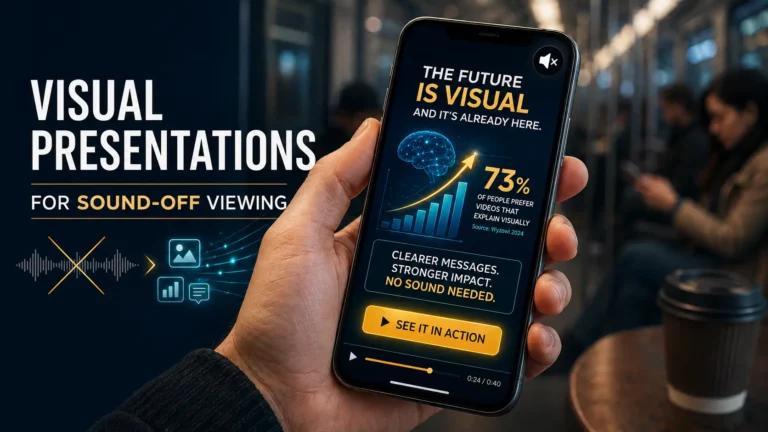
TL;DR: Most social media videos are now watched without sound, making silent video marketing (content that persuades even when the sound is off) a basic skill rather than a specialized one. A study by Verizon Media and Publicis Media found that 69% of people watch videos without sound in public, compared to 25% in private, and 80% are more likely to watch a video to the end if captions are available. Designing for silent viewing is based on three pillars: readable subtitles that are considered part of the design (not an afterthought), a visual hook in the first three seconds, and rhythm that supports the silent video dynamics. AI video tools now make this possible without a design team – transforming the script into a visual sequence with subtitles, ready for viewing without sound.

Design for Silent Viewing
So if your presentation, sales pitch, or training video relies critically on a speaker’s voice or a voiceover, you’re losing before the game even begins. You’re losing a large portion of your audience, who will literally never hear you at all.
This doesn’t mean video creators should return to the era of silent film. The question is different: how do you create a video that remains as attractive as possible and sells just as well as traditional audiovisual content, even without sound?
The answer is an approach called design for “design for silent viewing”. In this case, it requires us to stop relying on audio as the primary factor of attention retention. Videos should be created so that when the sound is off, the visual images and text blocks tell the story autonomously.
This isn’t simply “add subtitles”. Creating truly effective content requires a communication language in which the visual component plays a leading role from the beginning. If previously, we could compensate for the weak visual component with the speaker’s emotions and charisma, now this component has become secondary. Every image and every frame should be an “anchor” to attract attention. Stylish titles, dynamic scenes, high-quality subtitles, thoughtful graphics, and animation become critically important.
Anatomy of a Silent Pitch: How to Hold User Attention
To transform silent video into a powerful advertising and sales tool, you need to focus on the three pillars of visual communication: readability, context, and rhythm.
Text as a visual element
In a world without sound, subtitles cease to be an accessibility “crutch” – they become the primary carrier of meaning. However, there is a trap here: many people make subtitles too small or cluttered. Ideal “silent” subtitles should be part of the design. They should appear rhythmically, replacing each other so that the eye can “swallow” them at first glance, without tiring or annoying the viewer. This requires layout skills that were previously only available to professional UI designers.

Subtitles have now become a basic requirement – and increasingly a compliance requirement. 90% of video teams reported taking active steps to make their videos accessible, with captions the most common starting point, and the European Accessibility Act made accessibility a legal requirement in 2025 rather than just a best practice. In other words, both audiences and regulations now indicate that subtitling should be seen as an essential, not an optional feature.
Visual hierarchy and contrast
The first three seconds of a video decide everything. Without a strong visual trigger in the first seconds, the user keeps scrolling. What makes a trigger? A problem shown through a striking image that hits the client’s pain point. By the way, this image doesn’t have to be complex – it could, for example, be expressed through brightly presented performance metrics. If your video content starts with a company logo or a greeting, you’ve already missed the mark. It should start with a promise to solve a specific user problem.
Tempo and dynamics
In the absence of sound, the perception of time changes. A monotonous video without changing frames seems endless. AI tools create the perfect rhythm by controlling frame rates, visual effects, slides, and other elements to keep the user engaged throughout the presentation.
AI Director For Silent Video
Creating high-quality visual stories takes time, resources, and often design skills. This is where AI video platforms come in, automating much of the process and making it accessible to any business, organization, or blogger.

Artificial intelligence is capable of simultaneously acting as a director, cameraman, designer, and editor, leaving the author with only the role of producer. Among other things, we note three important capabilities of AI video platforms:
- Eliminating the blank-page problem. The hardest part of creating a video or video presentation is starting – 37% of non-video marketers say they simply don’t know where to begin. AI helps transform a text script immediately into a visual sequence, offering optimal templates that are already adapted for “muted” consumption. You don’t need to be a designer to make your pitch look professional.
- Context automation. AI algorithms can “understand” the essence of your idea and automatically highlight key points. For example, the system can highlight key metrics in a sales proposal (ROI or percentage of savings), turning dry numbers into understandable charts in a split second.
- Adaptive layout. AI helps you frame your videos correctly, ensuring that key elements of your content (headlines, calls to action, product images) always remain in view and don’t go out of focus. In addition, it easily adapts the style and format of the video to the target audience and the specific goals set by the author.
Strategy For a “Silent” Victory
To prevent your content from getting lost in an endless feed, use these techniques.
- The three-second rule. This is the gold standard of modern marketing. You have exactly three seconds to visually present the problem and hint that your video contains the solution. If you start with a long introduction, the user will leave. Use “talking” headlines. Instead of an abstract “Our innovative product”, write “We’ll reduce operating costs by 30%”. Specific details sell better than a feature description.
- Data visualization as part of the story. People struggle to process blocks of text, but they read graphs perfectly. Animated charts that are generated right before the user’s eyes create a sense of dynamism and authenticity. Using AI to generate such visualizations helps present complex data in a simple, understandable way that doesn’t require verbal explanation.
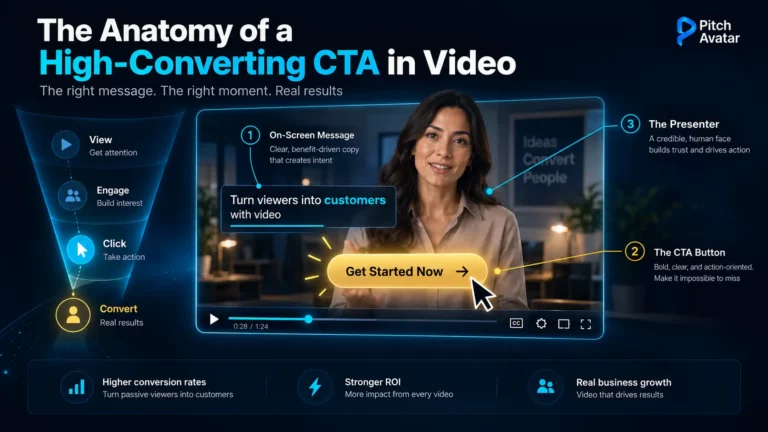
- The button as the main tool. Since the user won’t hear your call to action (CTA), they need to see it. A button like “Learn More”, “Download Demo”, “Contact Us”, or simply “Buy” should be a bright, high-contrast element. It shouldn’t just be at the end of the video; it should fit organically into the visual flow, becoming the logical conclusion of the story. In “silent” videos, a visual call to action is your best chance to convert a viewer into a customer.
When Sound Still Matters
Creating content that works without sound isn’t the same as eliminating sound, and a fair version of this argument must also take into account the other side of Facebook’s own data: 76% of video ads still require sound to be fully understood. At first glance, this seems like a contradiction. But that’s the whole point: these ads weren’t designed to be viewed without sound. They lose their meaning when the sound is turned off, because that meaning was not originally intended in the visual sequence.
Brand awareness and purchase intent didn’t differ significantly between viewers who watched the video with sound and those who watched it without sound. In other words, watching without sound doesn’t detract from the experience – provided the video was originally intended to be viewed with sound. The 76% figure doesn’t mean that videos without sound fail – it’s proof that most videos are still created with sound in mind, which comes with additional costs.
So where does sound still fit in? A few contexts:
- Content that requires careful thought and active clicking on links. When someone actively taps into a YouTube video or a long-form demo, they’ve often chosen to listen – listening intent is higher, and unmuting is more common. This is different from the passive, auto-playing feed that is the main focus of this article.
- Emotional storytelling and testimonials. A real human voice or musical accompaniment can deepen the connection with the audience in a way that text cannot, if the viewer has consented to listen.
- As an improvement, not a dependency. The workable rule is layered design: video should be completely understandable without sound, and sound should reward the viewer who decides to turn it on. Subtitles carry meaning, audio adds nuances. Create a structure so that everything important is contained exclusively in the audio track.
The point is that sound should be supportive, not dominant – the meaning should be retained even when the sound is muted, because that’s what it will be for the majority of your audience.
Selling In Silence
We live in a reality where sound is no longer a necessary condition for conveying meaning. On the contrary, silence has become a space for cleaner, visually focused communication. This is a challenge for business, but at the same time a huge opportunity.
Selling in silence is possible, and often more effective than the loudest presentation, because it respects the user’s time and space. With modern AI tools, you can create content that reaches the viewer even when their device is on mute – content that speaks for itself through clever layout, thoughtful pacing, and clear visual accents.
At the same time, the world is moving toward hyper-personalization, and there is a high probability that in the near future, we will see smart AI videos instantly adapt to silent mode, enhancing visual consistency and shifting emphasis. As paradoxical as it may sound, it seems likely that the most compelling voice for brands will be the one that can “speak” to the viewer without a sound.
If you want to create subtitled videos and voice-over-ready narration without a design team, try Pitch Avatar free or book a demo.