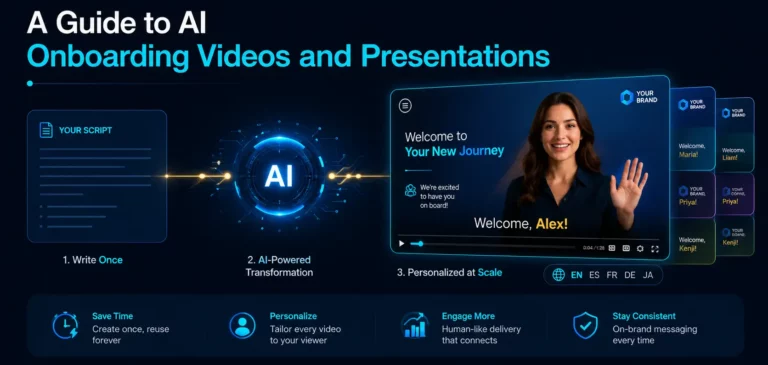
TL;DR: AI onboarding videos solve the oldest problem in corporate training: video is the most engaging format for onboarding, but personalizing it at scale has previously been impossible. Generative AI is changing this process: from a text script, HR professionals and managers can create a polished, personalized video or presentation in minutes using an AI presenter, voice cloning, and branding. This guide covers the most valuable use cases (personalized welcome videos, role-specific training, product walkthroughs, automated presentations, 24/7 assistants), a step-by-step workflow for creating your first AI onboarding video, a checklist for evaluating platforms, and the best practices that separate content people actually watch from text automatically converted to video.
Scaling Personalized Visual Content
In the world of corporate training and new employee onboarding, video plays a key role. It’s a highly engaging format that conveys tone, emotion, and complex information far more effectively than a static document – and audience data backs it up: 96% of people have watched explanatory videos to learn about a product or service, and 63% say a short video is their preferred way to learn something new, significantly ahead of text articles for 12%). But video has historically had one major drawback: it is difficult and expensive to personalize at scale. Creating a custom welcome video for every new hire, or a unique training module for every department, has been logistically impossible for most organizations – they simply didn’t have the time, budget, or production resources.

This is precisely the problem that generative AI solves. The rise of AI onboarding videos and AI presentation generators has transformed the content creation process. These tools enable HR teams and managers to create high-quality, personalized visual content in minutes instead of weeks. From a text script, users can create a polished video or a complete presentation – including pitch deck, visuals, and branding. This allows us to deliver personalized videos to onboard each employee, transforming the one-to-many communication model into a personalized approach that feels both professional and personal.
Use Cases for AI-generated Onboarding Content
The applications for AI-generated visual content in onboarding are broad and practical. These tools go beyond generic content to provide materials adapted to specific situations.

Personalized Welcome Videos
Instead of a standard email, a hiring manager can use an AI to create a two-minute welcome video for a new hire, addressing them by name. An AI avatar can introduce the team, outline the first week’s plan, and set a welcoming atmosphere. Voice cloning allows the avatar to use the manager’s own voice, adding authenticity and creating a truly personal first impression.
Role-Specific Training Modules
Lengthy technical documentation or company policy manuals can be transformed into a series of short, engaging videos. An AI presenter guides new employees through key points, while text and visuals on the screen reinforce the knowledge gained. This works especially well for training staff on job-specific tools and processes, and aligns with the principles of microlearning – delivering information in an easily digestible and memorable form.
Custom Product Walkthroughs and Demos
For sales and customer success teams, AI can generate product demos personalized to a specific client’s industry or use case. As part of the onboarding process for new sales employees, they can practice with demonstrations directly related to the target audience, which accelerates product adoption and increases confidence before interacting with a real client.
Automated Onboarding Presentations
An AI onboarding presentation generator can take a simple text outline of a 30-day plan and instantly create a complete, professionally designed presentation. This saves managers hours of design work and provides every new employee with a single, well-structured plan with a branded style.
24/7 Support With AI Assistants
AI assistants act as a personal “onboarding mentor” – answering common questions, helping new employees navigate administrative tasks, and providing immediate assistance. This is especially valuable for remote and international teams working across time zones.
True power emerges when these elements come together. An AI platform can track that a new employee has watched a training video, analyze the subsequent questions they ask the assistant, and capture their feedback in a follow-up survey. This integrated data can then improve the video script, update the assistant’s knowledge base, and personalize the next module. Onboarding stops being a static, linear process and becomes a self-optimizing system that adapts to each new employee.
How to Create Your First AI Onboarding Video: A 5-Step Workflow

Technology will only be useful if it fits into the workflow your team will actually perform. Here is a practical sequence of actions:
Step 1: Pick one high-frequency, frequently repeating asset
Don’t start with your most sensitive content. Start with the video you’d otherwise re-record or re-explain constantly – the first-day orientation, the benefits enrollment walkthrough, the tools stack overview. High repetition is where AI generation produces the greatest results.
Step 2: Write (or generate) a script built for spoken delivery
Take the source document and transform it into short, conversational sentences. Many platforms can draft the script from your existing slides or documents. In any case, read it out loud once – if you stumble, the avatar’s voice will sound unnatural too.
Step 3: Choose the presenter and voice
Decide between a stock avatar and a custom one, and between a standard AI voice and a cloned voice of the actual manager or mentor. For welcome videos, the real person’s cloned voice adds meaningful authenticity; for policy modules, a clear stock presenter is fine.
Step 4: Generate, then review like an editor
Create a video and then watch it in full. Check pronunciation of names and internal product terms, pacing of transitions, and whether the on-screen text matches the voiceover. Fix the script, regenerate – iteration takes minutes, that’s the whole point.
Step 5: Publish where new hires already are, and enable analytics
Embed the video in your onboarding portal, LMS, or workflow management tool, and make sure engagement tracking is enabled from day one. Completion and drop-off data for your first video will clearly show what needs to be improved in the second.
What To Look For In an AI Onboarding Video Platform
The market for generative AI content creation tools is growing rapidly, and the platforms vary much more than their demos suggest. Instead of chasing feature lists, evaluate candidates on the capabilities that determine whether the content is actually suitable for onboarding new employees:
- Interactivity, not just playback. A passive video informs, while an interactive video engages. Look for platforms where the presenter can answer viewer questions in real time (a chat-avatar), embed forms, and allow the viewer to direct the process. During the onboarding process, when each new employee has different questions, a two-way approach is preferable to a one-way one.
- Voice cloning quality. If voice authenticity is important for your use case (welcome videos, executive pitches), test voice cloning with real speakers and in different languages before making a final decision. Quality varies depending on platform and language pair.
- Analytics depth. Completion rate alone won’t tell you where a module is losing viewers. Pay attention to section engagement, drop-off points, question logs, and per-viewer reports – data that will help you improve your content, not just count views.
- Integration with your stack. The platform should connect to the systems that run your onboarding: your CRM or HRIS for personalization data, your LMS for delivery and tracking (SCORM export or API), and automation tools like Zapier so videos integrate into existing workflows.
- Language coverage. For distributed teams, check actual coverage – translation, voiceover, and avatar delivery in the languages you actually need, not just headline numbers.
- Branding features. Logos, colors, fonts, and templates to ensure consistency across everything your team creates.
- Speed of converting script into a video. The practical test: How long does it take from inserting the script to creating a finished branded video? On average, it takes a few minutes.
Pitch Avatar, for reference, is built around the interactive end of this checklist (presentations with avatars, a chat avatar for communication, voice cloning, per-slide engagement analytics, support for over 70 languages, and integration with HubSpot/Salesforce/Zapier). The combination that matters most when onboarding content needs to be measurable and two-way, not just broadcast.
Best Practices for Using AI Video
Using an AI to create an onboarding presentation or video is a powerful tool, but using it effectively requires a strategic approach. Simply converting text to video is not enough. These methods allow you to separate content that attracts attention from content that is ignored.

- Mind the “uncanny valley”. AI avatar technology has improved, but it can still create a subtle, almost human-like effect. Use AI avatars for what they do best: clear, informational, instructional content. For messages that require a deep emotional connection – a video with a real person is still often the best choice.
- Keep it short and focused (microlearning). AI tools make content creation easier, but that doesn’t mean creating long, confusing videos. Break down complex topics into short, focused videos of 2-5 minutes each. A well-structured library of micro-videos is better than a single hour-long presentation.
- Combine with human interaction. AI-generated videos shouldn’t exist in isolation. The best results are achieved with a combined approach: offering an AI-generated video as a pre-screening session before a live Q&A session with an expert. This “flipped classroom” allows information to be delivered in a standardized manner, freeing up time for discussion, clarification, and interaction with online session participants.
- Maintain brand consistency. Use tools that support brand personalization and apply your logos, color schemes, and fonts to all content. A consistent style strengthens your brand identity throughout the onboarding process and creates a cohesive user experience.
- Script for AI delivery. Write specifically for avatar delivery: clear, concise language, shorter sentences, phonetic spellings of complex names, and deliberate pauses for a natural speech rhythm.
- Design for engagement. Go beyond simply presenting delivery. Use on-screen text overlays, dynamic visuals, and chapter markers to reinforce key concepts and help new hires quickly return to specific topics when they need a refresher.
- Measure what matters. Track view duration, view completion rate, section re-view rate, and call-to-action clicks. This data shows what content is effective and where new employees are struggling or losing interest.
Conclusion: The Future of Onboarding Content
AI video and presentation creation tools are revolutionizing the process of creating onboarding content for new employees. They solve the long-standing problem of balancing scalability and personalization, making the process more efficient, engaging, and tailored to individual needs. For organizations creating a modern onboarding experience, these tools are no longer something new: they’re a key part of the content strategy toolkit. The future of onboarding content is not about choosing between scalability and personalization. It’s about achieving both.
The technology itself is also evolving – from generative AI, which creates content on command, toward agentic AI, which autonomously controls processes. In the future, the onboarding process for new employees could be managed by an AI agent that will manage the entire process: scheduling meetings, assigning personalized training based on real-time progress, and indicating when human manager intervention is needed.
These changes transform the role of the HR and management department. And as this progresses, the manager’s role will transform from a simple leader into a strategic coach, mentor, and shaper of corporate culture. HR’s role shifts from service delivery to designing, managing and optimizing these intelligent systems.
Frequently Asked Questions (FAQ)
An AI avatar is a photorealistic digital representation of a person. This digital character can be animated to speak text you specify in a script – effectively creating a video of a person presenting without a camera, microphone, or human actor. Many platforms offer a library of stock avatars, and some let you create a custom avatar of yourself.
The quality and realism of AI video have improved in recent years. Leading platforms produce highly realistic presenters with natural-sounding voices and synchronized lip movements. A subtle “uncanny valley” effect can still appear in some results, but the technology is more than sufficient for professional corporate communications and training.
Yes. The voice cloning feature allows you to record a sample of your voice, which the AI uses to create a digital version. The avatar can then speak any script with your cloned voice – adding authenticity and personalization, including in multiple languages.
No – AI is expected to complement the work of managers, not replace them. AI automates the repetitive, administrative side of onboarding process, freeing HR professionals and managers to focus on more valuable, human-centered work: strategic coaching, mentoring, building personal connections, and resolving complex situations that require empathy and judgment.
A successful implementation begins with a strategic approach. Audit your current onboarding process to identify problem areas and bottlenecks. Run a pilot project in one department to test the technology and measure impact. Select a tool that solves a specific, measurable problem from your audit (e.g., reducing the time managers spend creating presentations). Maintain clear ethical principles and communicate transparently with employees about how and why technology is used to build trust from the start.
Most professional AI video platforms are designed to work with corporate training systems. Many support exporting videos as SCORM (Sharable Content Object Reference Model) files – a standard format that most major LMS platforms can upload and track. Others offer API integrations connecting content creation directly to your delivery systems.